Original paper
Unifying Vision, Text, and Layout for Universal Document Processing
- Publication
- CVPR 2023Conference
- First submitted to arXiv
- arXiv:2212.02623
Cite this paper · BibTeX
The citation identifies the linked source version. It cites the original paper and its authors.
@misc{documentunderstandingudop2022,
  title = {{Unifying Vision, Text, and Layout for Universal Document Processing}},
  author = {Zineng Tang and Ziyi Yang and Guoxin Wang and Yuwei Fang and Yang Liu and Chenguang Zhu and Michael Zeng and Cha Zhang and Mohit Bansal},
  year = {2022},
  eprint = {2212.02623},
  archivePrefix = {arXiv},
  url = {https://arxiv.org/abs/2212.02623}
}
The appendix of this paper contains an unusual statement.
The authors write that the model's image generation could be used to forge signatures, tamper with the amounts on checks, or fabricate medical or financial records, so the image generation part won't be open-sourced directly. At most it will be offered as an API, with a classifier first screening out sensitive documents such as checks and ID cards.
What worried the authors this much is actually a model designed to “read” documents. UDOP stands for Universal Document Processing. It comes from two Microsoft Azure research teams and Mohit Bansal's lab at the University of North Carolina, with first author Zineng Tang affiliated with both. It aims to bring a document's image, text, and layout into one model and one format; the ability to edit documents is a side effect that came along with this unification.
Defining the Problem
Documents differ from ordinary image-text data. In a photo of a cat paired with a caption, the picture and the words are two separate things; the text on an invoice lives inside the image itself, and every word has a definite position.
The authors roughly divide the document models of the time into three types:
- A vision network feeding a multimodal encoder: a CNN or ViT first extracts image features, which then go into a multimodal encoder along with the text, as in LayoutLMv2 and DocFormer.
- One encoder taking both text and image: as in LayoutLMv3, where text tokens and image patches sit in the same sequence.
- Text only: OCR results plus 2D position embeddings, as in LayoutLM and LAMBERT.
The authors have three complaints about these approaches.
First, layout information is just a shallow position embedding, added to the text and considered done. But each word in a document corresponds one-to-one with the patch of image it sits in, and that relationship isn't put to good use.
Second, each downstream task needs its own head: a classification head for classification, a sequence labeling head for extraction, a start/end position head for question answering. Every new task means a new design.
Third, the pretraining objectives are mostly borrowed from a single modality, such as masked language modeling, or from general image-text pretraining, such as contrastive learning. The many labeled document datasets out there go almost entirely unused in pretraining.
Around the same time, Donut and Pix2Struct took the OCR-free route, generating text directly from pixels. UDOP keeps OCR. What it sets out to do is unify the words OCR reads, their coordinates, and the page image under one representation and one output format.
Solving the Problem
Overall Architecture
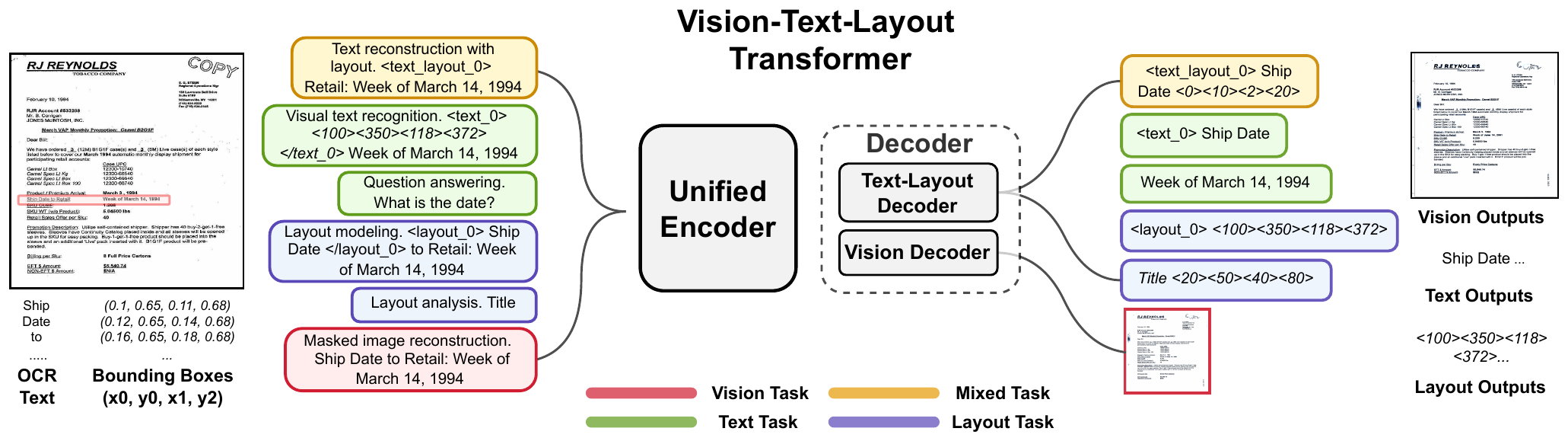
Read the figure from left to right. The input is a document image, plus the words OCR read from it and a box for each word. The middle column holds the task prompts, each task written as a piece of text, such as “Question answering. What is the date?” All tasks share one encoder, followed by two decoders, one generating text and coordinates and the other generating images.
The outputs on the right come in three kinds: text, layout tokens, and whole images. Note that layout is one of the outputs; Title <20><50><40><80> means “the title is in this box.”
The authors call the whole setup the Vision-Text-Layout Transformer, or VTL. The encoder and the text-layout decoder follow the T5-large architecture, and the vision decoder follows MAE-large's decoder, for 794 million trainable parameters in total.
Now, one piece at a time.
Each Word Moves Into Its Patch
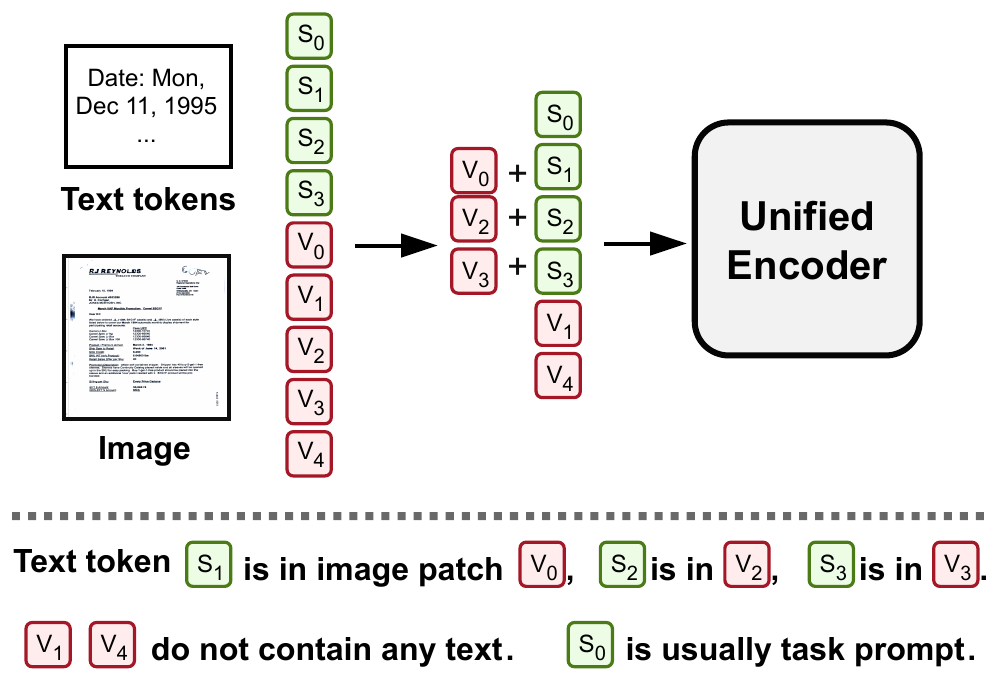
This is UDOP's central design, which the authors call layout-induced vision-text embedding.
The image is cut ViT-style into patches, each projected to a -dimensional vector ; text goes through the usual lookup table to give . Then check which patch the center of each word's box falls in:
If it falls in patch , that patch's image feature is added straight onto the word: .
Let's walk through it with numbers. The image is resized to with patch size 16, giving patches. Suppose OCR reads a word whose box center is at normalized coordinates , which is in pixels. It falls in column and row , that is, patch . The word's input embedding is its own text embedding plus .
If several words share the same patch, each of them gets the same added.
What about patch 144 itself? In the authors' design, a patch that contains words no longer appears separately in the sequence; its information has already been merged into those words. Patches without words, such as blank space, pictures, and table lines, stay as they are: . So the sequence entering the encoder is “all the words” plus “the patches with no words.” V1 and V4 in the figure are of this kind. Tokens without a position, such as the task prompt, get the box and land on a dummy patch.
Comparing with LayoutLMv3 makes the difference clear. LayoutLMv3 also has one encoder taking both text and image, but words and patches are two separate groups of tokens in the sequence, and which corresponds to which is left for attention to learn. UDOP adds each word and its patch together right at the input.
For position, UDOP follows TILT and adds a 2D relative position bias to the attention scores, similar to T5's relative bias. The authors point out that the encoder has no 1D position embedding, because joining words with their patches, plus the 2D bias, already conveys the layout.
Coordinates Are Words Too
For layout to be generated as well, coordinates first have to become tokens.
UDOP borrows the approach from work like Pix2Seq, which frames detection as sequence generation. Coordinates are normalized to 0–1, multiplied by the size of the layout vocabulary, and rounded. In the paper's example, the box with a vocabulary size of 500 becomes four tokens, <50><100><250><300>.
These tokens can be inserted directly into a text sequence. The input can state “where these words are,” and the output can ask the model to “tell me where it is,” so layout analysis becomes generating a string of coordinate tokens.
Four Self-Supervised Tasks
The main pretraining data is IIT-CDIP: 11 million scanned documents, with OCR text and a box for every word already prepared. The authors designed four tasks, all illustrated with the same sentence:
Ship Date to Retail: Week of March 14, 1994
Joint text-layout reconstruction. Mask 15% of the words and have the model write out both the masked words and their coordinates. The input is “Joint Text-Layout Reconstruction. <text_layout_0> to Retail: Week <text_layout_1> March 14, 1994,” and the target is “<text_layout_0> Ship Date <100><350><118><372> <text_layout_1> of <100><370><118><382>.” This is masked language modeling with positions added.
Layout modeling. The reverse: given the words, the model writes out where they are. This task masks 75%; the authors say a smaller ratio makes it too easy.
Visual text recognition. Reverse it again: given coordinates, the model reads out what is written at that position. 50% is masked. The masked words have been removed from the input, so the model can only read them from the image features at that position, which forces it to align image and text.
Masked image reconstruction with text and layout. This is a variant of MAE. Mask 75% of the image patches and have the vision decoder draw the whole document back. There are two differences from the original MAE. First, the decoder's input is replaced by a sequence of learnable placeholder vectors, as long as the target image's patch count, in two kinds, “this patch is masked” and “this patch isn't”; since image and text are already mixed together in the encoder output, the visible patches can't simply be plugged back in as in MAE. Second, besides the encoder output, the decoder also looks at each word's character embeddings. The text in documents is mostly letters, digits, and punctuation, and knowing which characters make up a word is what lets it be drawn clearly.
The first three tasks each use different prompts and sentinel tokens, so the same sentence can test three abilities, and the model knows from the prompt what it is supposed to write this time.
Labeled Data Goes into Pretraining Too
UDOP writes every task as “prompt plus input, generate an output,” so labeled datasets can be mixed straight into pretraining:
- Document classification: RVL-CDIP, outputting the class name.
- Layout analysis: PubLayNet, prompted with “Layout Analysis on PubLayNet” plus an element name such as Title, outputting the boxes of all titles.
- Information extraction: DocBank, Kleister Charity, PWC, DeepForm, outputting field classes and each word's box.
- Question answering: WebSRC, VisualMRC, DocVQA, InfographicVQA, WikiTableQuestions, outputting the answer.
- Document inference: TabFact, outputting “Entailment” or “Not Entailment.”
Together they come to about 1.8 million examples. The authors stress that none of the downstream validation or test sets were used in pretraining.
Training follows a resolution curriculum, starting at 224, then 512, and finally 1024, with one epoch per stage. At 1024 resolution an image has 4,096 patches, and using images that large from the start would be too slow. The optimizer is Adam with a learning rate of and a batch size of 512. The authors replied on GitHub that rerunning pretraining takes roughly 64 V100 32GB or 32 A100 40GB GPUs.
Discussion
DUE Benchmark
The main evaluation is DUE (Document Understanding Benchmark), seven datasets in three groups: question answering, information extraction, and table QA and inference. The table below shows three representative models from Table 2 of the paper:
| Dataset | T5-large+2D+U | LayoutLMv3-large | UDOP |
|---|---|---|---|
| DocVQA | 81.0 | 83.4 | 84.7 |
| InfographicVQA | 46.1 | 45.1 | 47.4 |
| Kleister Charity | 75.9 | 77.1 | 82.8 |
| PWC | 26.8 | 26.9 | 28.0 |
| DeepForm | 83.3 | 84.0 | 85.5 |
| WikiTableQuestions | 43.3 | 45.7 | 47.2 |
| TabFact | 78.6 | 78.1 | 78.9 |
| Average | 59.8 | 62.9 | 64.8 |
Compiled from Table 2 of the paper, test sets. T5-large+2D+U is the T5 from the TILT paper with 2D positions and unsupervised pretraining added.
UDOP comes first on all seven tasks, with an average 1.9 above LayoutLMv3-large. The widest gap is on Kleister Charity, 82.8 versus 77.1, a dataset for extracting fields from the filings of UK charities. UDOP also reached first place on the DUE leaderboard in November 2022.
However, UDOP's supervised pretraining used the training sets of all seven datasets, DocVQA, InfographicVQA, Kleister Charity, PWC, DeepForm, WikiTableQuestions, and TabFact. In other words, it had already practiced every task in the table, multitask-style, during pretraining; LayoutLMv3 hadn't. As the ablations below show, this step is worth 0.6 points on the DocVQA validation set.
The authors also compared against TILT. Before fine-tuning on DocVQA, TILT is additionally trained on a set of QA data including SQuAD. With the same extra training, UDOP goes from 84.7 to 87.8 on DocVQA and jumps from 47.4 to 63.0 on InfographicVQA, both slightly above TILT's 87.1 and 61.2.
FUNSD, CORD, RVL-CDIP
| Dataset | LayoutLMv3-large | UDOP |
|---|---|---|
| FUNSD | 92.08 | 91.62 |
| CORD | 97.46 | 97.58 |
| RVL-CDIP | 95.93 | 96.00 |
Compiled from Table 3 of the paper.
On these three datasets, UDOP and LayoutLMv3 are nearly tied. UDOP loses by 0.46 on FUNSD; it wins by 0.12 on CORD, one of the paper's “SOTA on 8 tasks”; and it wins by 0.07 on RVL-CDIP. The standard deviations reported in the paper's appendix are 0.34 for FUNSD, 0.15 for CORD, and 0.26 for RVL-CDIP, so all three gaps fall within one or two standard deviations.
Ablations
The ablation of pretraining objectives is run at 224 resolution, on the DocVQA and RVL-CDIP validation sets:
- Masked language modeling only: 79.7 / 95.3.
- Switching to joint text-layout reconstruction: 82.8 / 95.4. Just asking the model to write out coordinates as well adds 3.1 on DocVQA.
- Adding visual text recognition: 83.3 / 95.4.
- Adding layout modeling: 84.0 / 95.6.
- Adding masked image reconstruction: 84.4 / 96.2. RVL-CDIP jumps the most at this step; document classification relies heavily on the look of the whole page to begin with.
- Adding supervised data: 85.0 / 96.3.
Two more ablations are worth setting side by side. One is UDOP-Dual, which replaces the unified encoder with separate text and image encoders: parameters grow from 794 million to 1.098 billion, yet the DUE average drops from 64.8 to 64.6. The other removes the image embedding at the input, keeping only text and layout: DocVQA drops only from 84.7 to 84.4, while InfographicVQA falls from 47.4 to 45.0.
So on text-dense DocVQA, the image contributes almost nothing; only on infographics, with lots of graphics and little text, does it help, by two or three points. This matches an observation in the Pix2Struct paper: DocVQA is so text-dense that text alone already does very well.
A Document Model That Draws
The vision decoder is what sets UDOP furthest apart from other document models. Start with reconstruction:
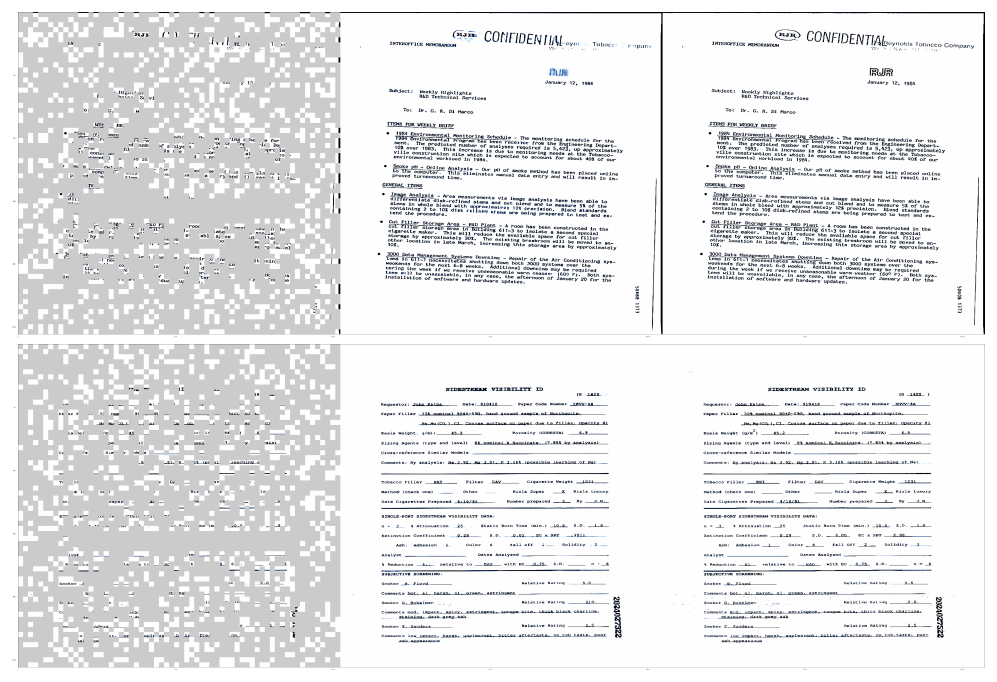
On the left, three quarters of the page is masked; the middle is the reconstruction and the right is the original. The reconstructed text is clear enough to read directly. This isn't entirely something the model “saw”: the OCR text and layout tokens already told it which words were in the masked areas and where. The vision decoder's job is to draw those words back in a font, size, and spacing consistent with their surroundings.
If it can draw the text back, it can draw different text too:
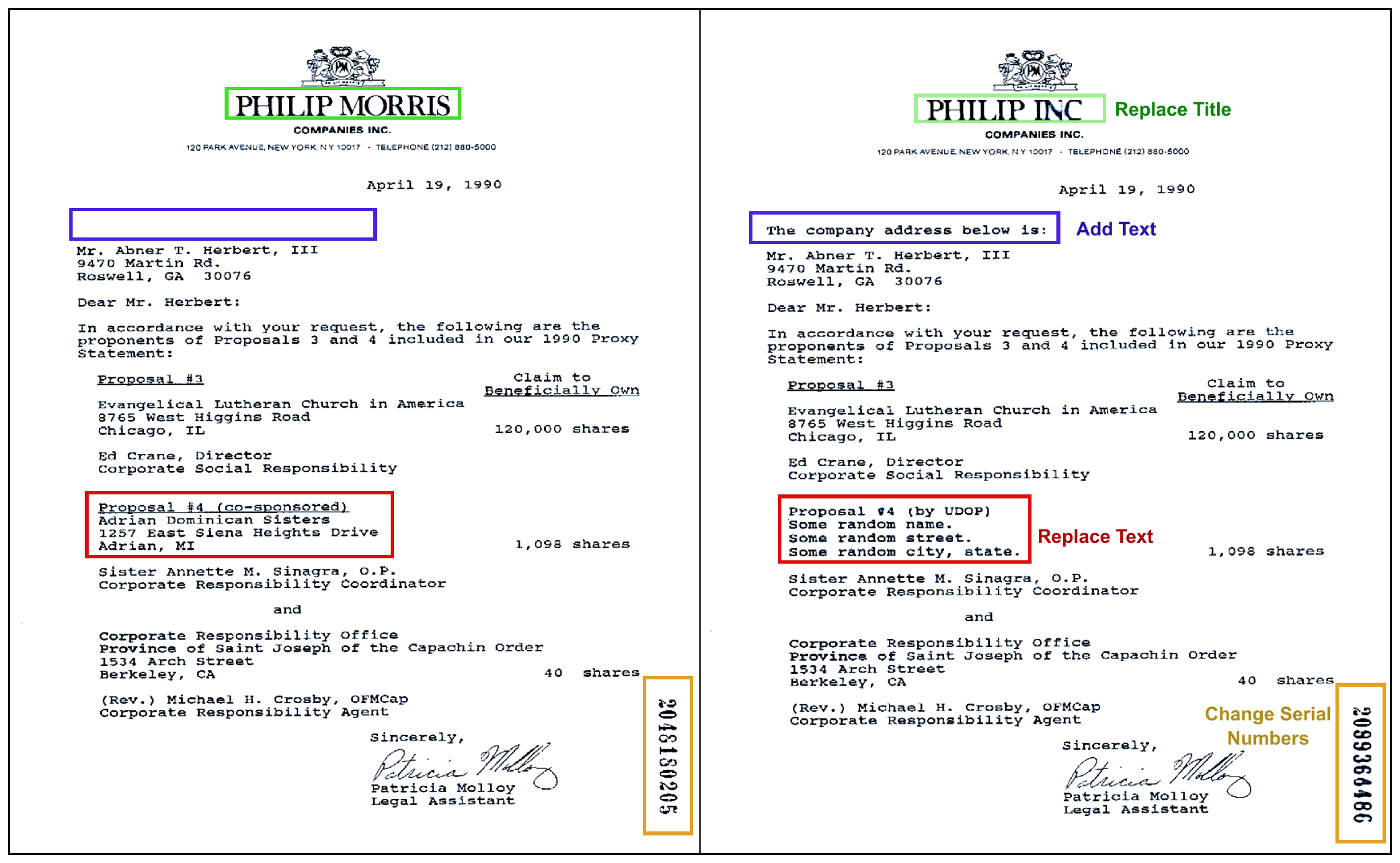
A single run changes four places in this letter. The letterhead goes from PHILIP MORRIS to PHILIP INC; a line of text appears in the blank space; an address is swapped out; and the serial number at bottom right, printed vertically and turned 90 degrees, is replaced with a different one. The method is to mask the region to change in the image, write the new content in the text input, and specify the position with layout tokens.
The edited text matches the original letter's typewriter font, size, and orientation, even keeping up with the vertical text. The paper also demonstrates layout editing, such as changing where lines break or moving the signature block at the end of the letter elsewhere; looking only at a few retained patches, the model regenerates the whole page.
The generation and editing section has no quantitative evaluation at all, only hand-picked examples; and those examples are nearly all tobacco company documents from IIT-CDIP, such as an R.J. Reynolds memo and a Philip Morris shareholder proposal letter. The model was pretrained on these documents, so it's no surprise it draws them convincingly. How it would do on Chinese invoices or handwritten forms, the paper doesn't test; the authors also admit in the appendix that non-Latin scripts would need more character embeddings.
How Far the Release Went
The code ended up under Microsoft's i-Code project, whose README has a release checklist. The encoder and text decoder are checked, as are most scripts and the demo; the box for the vision decoder and weights is not, with a note beside it: “Due to fake document generation ethical consideration, we plan to release this functionality as an Azure API.” Both repos were later archived as read-only, and that box was still empty when they were (the paper's proudest trick, document editing, readers can only admire in the PDF).
The vision decoder isn't the only thing out of reach. The released weights are the 224 and 512 resolution versions; the 1024 resolution used in the paper's main experiments was never released. In March 2024 someone asked in issue #127 whether there were plans, and there has been no reply to this day. The same goes for the pretraining code: people have been asking in #23 since February 2023, and the repo still contains only downstream fine-tuning code. In the same month as #127, someone else asked the authors in #128 for an example script for document editing, and that went nowhere either.
The good news is the license. The released weights are MIT, and Hugging Face transformers added UDOP in 2024. LayoutLMv3, also from Microsoft, has CC BY-NC-SA weights that can't be used commercially.
Conclusion
UDOP unifies things in three places. Each word is added to its image patch at the input; coordinates become tokens generated along with the text; and every task, labeled datasets included, is written as a prompt plus generation. This approach takes first place on all seven DUE tasks, averaging 64.8, 1.9 above LayoutLMv3-large.
However, it had already trained on the training sets of all seven DUE tasks during pretraining, which LayoutLMv3 hadn't; on FUNSD, CORD, and RVL-CDIP, the gap between the two falls within one or two standard deviations. The ablations also show that the image contributes only 0.3 on DocVQA; most of the score still comes from the words OCR reads.
What sticks in the memory, ironically, is the vision decoder that edits letters, and sadly it lives only in the paper's figures. If you actually want UDOP in a product, its most practical advantage is the license. The document-reading versions on Hugging Face, at 224 and 512 resolution, are MIT; its Microsoft sibling LayoutLMv3 can't be used commercially, and UDOP can.