Original paper
OCR-free Document Understanding Transformer
- Publication
- ECCV 2022Conference
- First submitted to arXiv
- arXiv:2111.15664
Cite this paper · BibTeX
The citation identifies the linked source version. It cites the original paper and its authors.
@misc{documentunderstandingdonut2021,
  title = {{OCR-free Document Understanding Transformer}},
  author = {Geewook Kim and Teakgyu Hong and Moonbin Yim and Jeongyeon Nam and Jinyoung Park and Jinyeong Yim and Wonseok Hwang and Sangdoo Yun and Dongyoon Han and Seunghyun Park},
  year = {2021},
  eprint = {2111.15664},
  archivePrefix = {arXiv},
  url = {https://arxiv.org/abs/2111.15664}
}
You take a photo of a receipt and want a result like this out of it:
{"items": [{"name": "3002-Kyoto Choco Mochi", "count": 2, "unitprice": 14000}]}
The standard approach in 2021 took three steps. First, text detection finds a box around every piece of text; then text recognition reads the words in each box; finally, those words and their coordinates go to a model like BERT or LayoutLM, which decides which word is the item name and which is the unit price, and assembles the structure above.
This paper comes from NAVER CLOVA. If you haven't heard of the team, they built the text detection model CRAFT and also ran a large-scale benchmark of scene text recognition; Donut's first author, Geewook Kim, was the second author of that benchmark paper, and co-authors Dongyoon Han and Sangdoo Yun worked on both. CLOVA also sells its own commercial OCR API.
A team that makes its living from OCR proposes, in this paper, to get rid of OCR.
Defining the Problem
The authors have three complaints about OCR.
The first is cost. Getting good enough OCR results makes inference itself expensive; the paper estimates that state-of-the-art OCR models at the time needed over 80 million parameters for detection plus recognition alone. And if you want to train your own OCR, that takes lots of data and training cost.
The second is flexibility. An off-the-shelf OCR engine can lose accuracy as soon as you switch to another language or another kind of document, and users have little room to adjust it.
The third is errors propagating downstream. If OCR misreads a character, the understanding model after it receives the wrong character, and no amount of cleverness can recover it. For languages with large character sets, like Korean and Chinese, OCR quality is worse to begin with, so the problem is more serious. The usual fix is to add a correction module after OCR, which gives the system one more part to maintain.
So what the authors want is a model that goes straight from the image to structured output, with no OCR anywhere in between.
That sounds refreshingly clean, but it runs into a question right away. Models like LayoutLM can concentrate on "understanding" because the "reading" has already been done by OCR. Take OCR away, and where does the model learn to read?
Solving the Problem
One Encoder, One Decoder
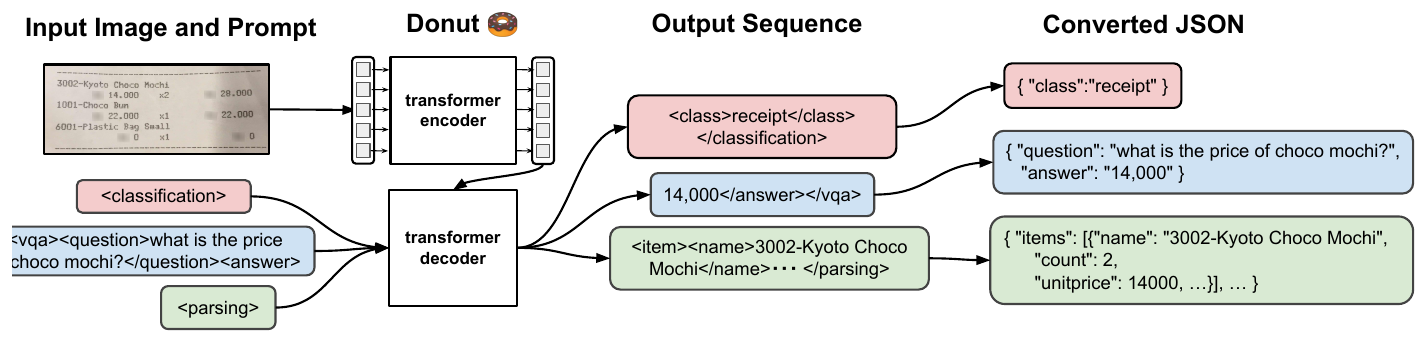
Donut is short for Document understanding transformer (the authors are clearly fond of doughnuts too). The architecture is a standard encoder-decoder:
- The encoder is a Swin Transformer. The authors compared several backbones in preliminary experiments, and Swin did best on document parsing. The final version is a modified Swin-B. The original's four stages have layers, and here the third stage is cut to 14 layers and the window size changed to 10.
- The decoder is BART, with weights initialized from a public multilingual BART model, keeping only the first four layers.
Let's follow a receipt through it.
During pretraining, the input image is resized to . The feature map of Swin's last stage is the size of the original, so what the encoder hands the decoder is an feature map, which flattens into 4,800 vectors.
At every step, the decoder reads these 4,800 vectors through cross-attention and produces one token. Where it starts writing depends on the opening we give it.
That is how Donut handles different tasks. Each downstream task has its own special tokens as a prompt, and when the model sees the prompt, it knows what to write next:
- Give it
<classification>, and it writes<class>receipt</class>. - Give it
<vqa><question>what is the price of choco mochi?</question><answer>, and it continues with14,000</answer>. - Give it
<parsing>, and it writes out a whole string of<item><name>3002-Kyoto Choco Mochi</name>….
Every field in the output is wrapped in a pair of start and end tokens, and this token string converts one-to-one to and from JSON; a regular expression is enough to recover it. If the model writes <name> but forgets </name>, that field counts as not extracted.
As for the classes in the classification task, the authors simply add a special token for each class, such as [memo], and writing that token amounts to answering with that class.
The whole model has no extra classification head and no module that predicts where an answer starts and ends. Every task is "write out a piece of text."
First, Learn to Read
Back to the earlier question. How does the model learn to read?
The authors' pretraining task is very plain. The model is told to write out all the text in the image in reading order (basically top-left to bottom-right), one token at a time. The loss is next-token cross-entropy. The authors themselves say this can be seen as a "pseudo-OCR" task.
The data comes from two sources.
The first is IIT-CDIP, a dataset of 11 million scanned English documents, the same one the LayoutLM series is pretrained on. These images have no text annotations of their own, so the authors ran them through their in-house CLOVA OCR API and used the results as pseudo-labels.
Yes, the "OCR-free" model's pretraining answers come from OCR. OCR-free means OCR isn't needed at inference; during training, OCR still got its turn as the teacher.
The second source is the authors' own synthetic data generator, SynthDoG (Synthetic Document Generator). The reason is practical. IIT-CDIP is English only, and no real document collection anywhere near that size exists for other languages.
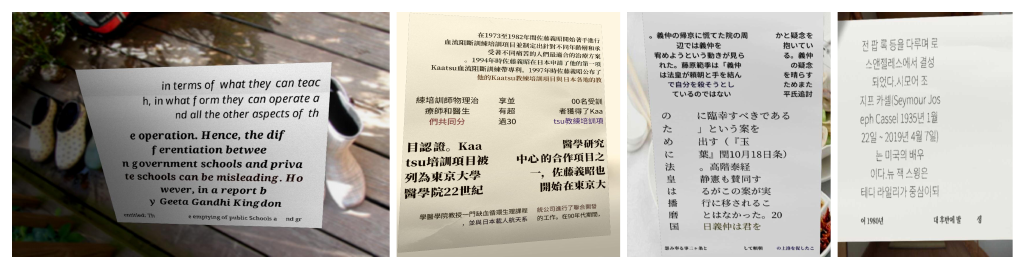
A synthetic document is a stack of four layers:
- Background: a random photo from ImageNet, with a little random blur to simulate being out of focus.
- Paper: textures taken from paper photos the authors collected, with elastic distortion and noise added, then a random perspective transform to simulate shooting from different angles.
- Layout and text: a rule-based generator places a few rectangular regions on the paper at random as paragraphs and splits each region into several lines; the text is sampled from Wikipedia, the font is the multilingual Noto, and the color is random.
- Post-processing: color, brightness and contrast are adjusted, then shadows, motion blur, Gaussian blur and JPEG compression are added.
Using Wikipedia in Chinese, Japanese, Korean and English, they generated 500,000 images per language.
Pretraining ran for 200,000 steps on 64 A100s with a batch of 196, taking about two to three days.
Then, Learn to Understand
Once it can read, fine-tuning teaches it to "understand." Every downstream task is recast as "look at the image, write JSON," with only the prompt and the target sequence changing.
A side effect is that fine-tuning data is easy to make. Annotators only have to write one JSON per image, without labeling a single text box.
Discussion
Classification: Twice as Fast
RVL-CDIP is the standard document classification dataset: 400,000 scanned documents in 16 classes, such as letters, memos and emails.
Donut's accuracy is 95.30%, LayoutLMv2's 95.25%, and LayoutLM's (the version with image features) 94.42%. The scores are about the same, but Donut has only 143 million parameters and takes 752 milliseconds per image; LayoutLMv2 has 200 million parameters plus OCR and takes 1,489 milliseconds per image.
The LayoutLM-family scores here come from their own papers, while the times were measured by the authors with the MS OCR API used in the LayoutLMv2 paper; Donut ran on a single P40, which is much slower than an A100.
Information Extraction: Look Closely at What's Compared
This is Donut's headline task. The authors use four datasets:
- CORD: a public receipt dataset, 800 for training and 100 for testing, with 30 kinds of fields and nested structures such as "item > name, count, price."
- Ticket: a public dataset of Chinese train tickets with 8 fields, each appearing only once and in a fixed position.
- Business Card: Japanese business cards from a NAVER in-house service, 20,000 for training, 11 fields.
- Receipt: Korean receipts from a NAVER in-house service, 40,000 for training, 81 fields, with the most complex structure.
There are two kinds of scores. Field-level F1 requires an entire field to match character for character; one wrong character means failure, and it can't tell whether the structure was assembled correctly. So the authors also treat the JSON as a tree and compute an accuracy from tree edit distance:
is the prediction, the ground truth, and an empty tree. The denominator is the number of steps it takes to "build the ground truth from an empty tree," so writing nothing at all scores 0, and a perfect answer scores 1. It's the same idea as PubTabNet's use of tree edit distance to evaluate tables, just normalized differently.
| Dataset | BERT | LayoutLMv2 | Donut |
|---|---|---|---|
| CORD | 73.0 / 65.5 | 78.9 / 82.4 | 84.1 / 90.9 |
| Ticket | 74.3 / 82.4 | 87.2 / 90.1 | 94.1 / 98.7 |
| Business Card | 40.8 / 72.1 | 52.2 / 83.0 | 57.8 / 84.4 |
| Receipt | 70.3 / 54.1 | 72.9 / 78.0 | 78.6 / 88.6 |
Each cell is "F1 / tree edit distance accuracy." On CORD, BROS and LayoutLM were compared as well, with F1 of 74.7 and 78.4 respectively; the two methods that generate structure directly, SPADE and WYVERN, also lose to Donut on all four datasets.
Donut wins on all four datasets, and on CORD it takes 1.2 seconds per image, faster than LayoutLMv2's 1.7.
If you've read the LayoutLMv2 paper, something may seem off. Wasn't LayoutLMv2's F1 on CORD somewhere around 95? How did it fall to 78.9 here?
The two numbers aren't measuring the same thing. The LayoutLMv2 paper uses the official OCR annotations that come with CORD, that is, the correct text and boxes, so the model only has to attach a field label to each word. The baselines in the Donut paper start from the raw image, run CLOVA OCR, sort by coordinates, attach labels and finally assemble the JSON, and they're compared all the way through to the final structure. OCR errors and assembly errors all count against LayoutLMv2.
The latter is closer to real use, and it's exactly what Donut wants to prove; but when you see the two papers' CORD numbers differ by more than ten points, this is why.
Document QA: A Loss This Time
DocVQA is a dataset of questions about document images for the model to answer, scored with ANLS, an edit-distance-based metric that tolerates small spelling differences.
Donut's ANLS is 67.5, below both LayoutLM's 69.8 and LayoutLMv2's 78.1. The paper calls this result "competitive"; the more honest description is that it lost by a fair margin.
On the handwritten subset, though, Donut gets 72.1, higher than LayoutLMv2-Large-QG (67.3), which uses a large model, extra data and generated-question augmentation. Handwriting is exactly where OCR goes wrong most easily.
The authors also candidly include a failure case. The question asks for a document's publication number; the answer is 540, but Donut replied with 943, another number in the image. Small text on a large document can't be made out at this input resolution.

This figure shows most clearly what it means that "OCR is the middleman."
The left chart is the same LayoutLMv2 on CORD with four different OCR engines. With the open-source EasyOCR it scores about 44; switch to CLOVA OCR and it scores about 82. Exactly the same model, nearly 40 points apart, all down to the OCR in front of it. Donut is unaffected and sits around 91 at both resolutions.
The middle chart is speed. OCR plus LayoutLMv2 takes 1.4 to 1.9 seconds per image; Donut needs only about 0.7 seconds at , and just over 1.2 seconds even at .
The right chart is the amount of training data. Cut CORD's training set from 800 images to 80, and the Donut still scores just over 80, about the same as LayoutLMv2 trained on all 800. When data is scarce, Donut with the larger input resolution holds up better.
Pretraining, Backbone and Resolution

These ablations settle several design choices:
- Pretraining should teach reading. With no pretraining, document classification, or image captioning instead, CORD only reaches the 30s to low 40s; all three reading pretraining setups jump above 85.
- Whether synthetic data is enough depends on the task. Pretraining on SynthDoG alone already works well for CORD; DocVQA clearly needs IIT-CDIP's real scanned documents. The authors' explanation is that IIT-CDIP and DocVQA have very similar image distributions.
- Backbone. Among the several ImageNet-pretrained backbones, EfficientNetV2 and Swin do better; the authors chose Swin because Transformers scale more easily, and its score is slightly higher too.
- Higher resolution is better, at the cost of compute. DocVQA has large images and small text, so going from to helps it the most. The cost is that attention compute balloons; the authors know efficient attention exists but kept the architecture simple and didn't switch.
The cost of resolution shows up in fine-tuning as well. Fine-tuning CORD or Ticket at takes about half an hour on a single A100; at , the authors fine-tuned on 64 A100s, and DocVQA took about one GPU-day and RVL-CDIP about two.
The Hole in the Donut
What the paper left out, GitHub users filled in.
The most common complaint is no coordinates. In the traditional pipeline every word has a box, so extracted fields can be traced back and marked on the original image; Donut only writes text. The paper shows that the decoder's cross-attention lands near the word being written, and the authors say it can serve as an auxiliary indicator for localization. As early as September 2022 someone opened an issue asking for box output, and the community followed that idea, piecing heatmaps together from cross-attention; the person who built one admitted it wasn't very accurate.
The second is not knowing when it's wrong. A user running Donut for document QA listed its shortcomings in issue #90 (November 2022), and first on the list was that there's no reliable way to filter answers, since the sequence's confidence score can be high for right and wrong answers alike. A few weeks later, replying to someone else, the same user put it more bluntly, writing "In my opinion, it's not ready" for production and "Donut is a cool proof of concept, but for wider adoption, I think it needs some serious changes."
This problem gets especially bad when something is wrong with the image. Someone reported in issue #64 that a fine-tuned Donut fed an upside-down document still output perfectly formatted JSON, with names stitched together from the training data, realistic enough that human reviewers couldn't tell. Someone else reported in issue #272 that given a blank image, it still writes out content. When OCR misreads, what's left is usually a visible typo; when a generative model misreads, what it writes can look entirely real.
There are smaller pitfalls too. Issue #229 points out that with the donut-base tokenizer on Hugging Face, the digit 1 turns into <unk> when another character comes right before it: A1 decodes back as A<unk>, while A2 is fine (and receipts just happen to be full of numbers). There's no official approach to multi-page documents, so users can only stitch several pages into one long image.
As for maintenance, the README said in June 2023 that dependency updates were making the testing environment harder and harder to set up, and that the team was "actively working on a solution"; the last commit was in July 2023, and over two hundred issues and PRs are still open. Fortunately, Donut was folded into Hugging Face transformers long ago, and that's where most people actually use it.
Conclusion
One encoder plus one decoder, pretrained on "read out the text," can write structured JSON straight from an image. Donut pulled this off in 2021, and on documents with well-defined fields, such as receipts and tickets, it beat the full OCR-plus-LayoutLMv2 pipeline, faster to boot.
It also lays the costs on the table. The output has no coordinates and no reliable confidence score, and when the image goes wrong it makes up answers with a straight face; reading small text clearly means raising the resolution, and the compute goes up with it. The gap on DocVQA shows that finding small text on a big page to answer a question takes more than reading pretraining at this resolution.
The road didn't end there. Meta's Nougat kept Donut's architecture to turn academic papers in PDF straight into Markdown; later, models like GOT and DeepSeek-OCR swapped the decoder for a language model, still following the same "image in, text out" line.
If your application needs to know where each field sits in the original image, or needs a signal that says "I'm not sure about this answer," you can't cut out the OCR middleman just yet. On the other hand, if you're facing large volumes of documents in a fixed format, fine-tuning Donut on a hundred labeled JSONs is a cheap thing to try. Just remember to straighten the images before you go live.