Original paper
LayoutLM: Pre-training of Text and Layout for Document Image Understanding
- Publication
- KDD 2020Conference
- First submitted to arXiv
- arXiv:1912.13318
Cite this paper · BibTeX
The citation identifies the linked source version. It cites the original paper and its authors.
@misc{documentunderstandinglayoutlm2019,
  title = {{LayoutLM: Pre-training of Text and Layout for Document Image Understanding}},
  author = {Yiheng Xu and Minghao Li and Lei Cui and Shaohan Huang and Furu Wei and Ming Zhou},
  year = {2019},
  eprint = {1912.13318},
  archivePrefix = {arXiv},
  url = {https://arxiv.org/abs/1912.13318}
}
By the end of 2019, BERT had already swept through every NLP leaderboard. The obvious way to use it on documents was to feed the scan to OCR, get back a string of text, and hand that string to BERT for labeling or classification.
The trouble is the string OCR hands back. On a funding request form, "Date Routed:" sits on the left and "January 11, 1994" right next to it on the right; on a receipt, "TOTAL" is on the bottom line, with the amount printed at the far right of the same line. On paper you see these relationships at a glance. Flatten the page into a one-dimensional sequence and all that is left is the order; BERT has no idea which two words actually share a line.
LayoutLM, from a team at Microsoft Research Asia (the two co-first authors were interns from Harbin Institute of Technology and Beihang University), adds a set of "coordinate embeddings" at BERT's input, so that as the model reads each word it also knows where on the page that word sits. Pretraining used 11 million pages of scanned documents, and that collection has quite a history, which we'll get to later.
Defining the Problem
The authors care about business documents such as purchase orders, invoices, receipts, forms, letters and résumés. Information in these documents often hides in the layout, and every company and every kind of form uses its own format.
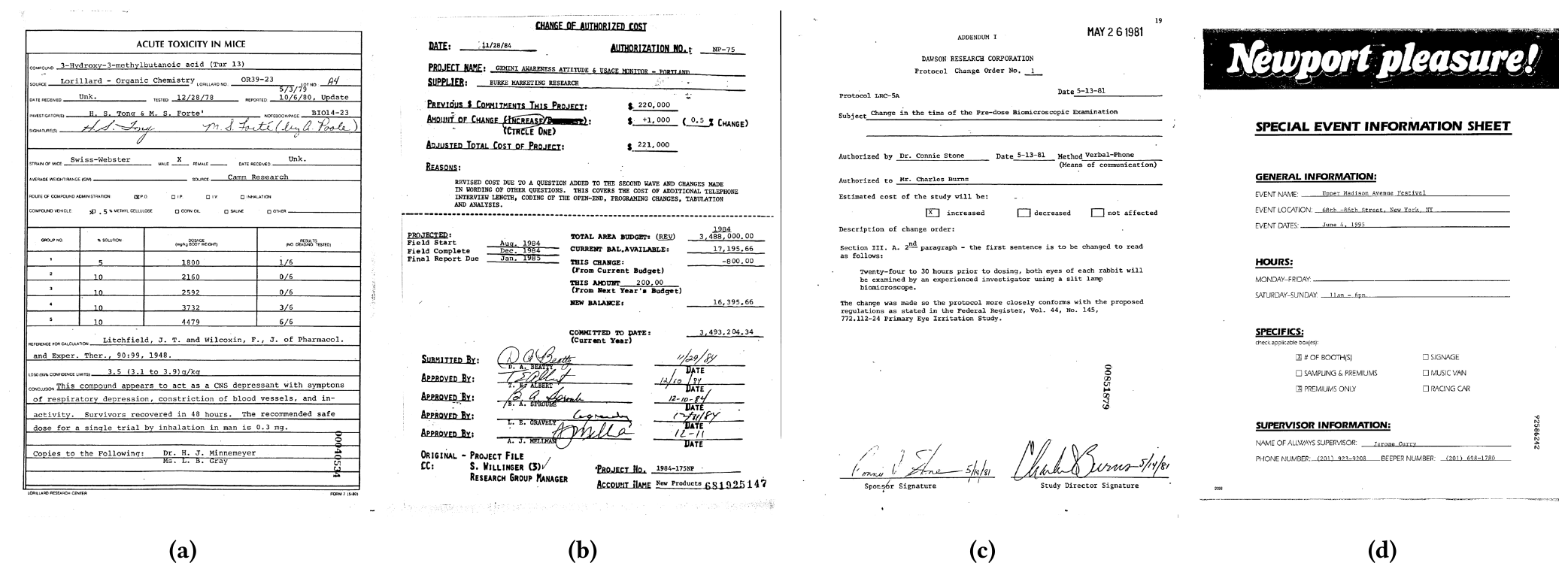
Look at the layouts of these four first. The two on the left are tables with fields and ruling lines, the third is a typed page with handwritten signatures, and the fourth is an event information sheet with field names on the left, the filled-in content on the right, and a row of checkboxes. What the words mean matters, of course, but "what is this field's value" often depends on which words sit beside it or below it.
Methods for these documents at the time fell roughly into two camps. On the computer vision side, layout analysis was treated as object detection, with Faster R-CNN or Mask R-CNN drawing boxes around tables and paragraphs; or, as in the multimodal FCN of Yang et al., segmentation happened at the pixel level. On the natural language side, the OCR output was treated as plain text, or, as in Liu et al., the text boxes were wired into a graph and graph convolution combined text and visual features.
The authors see two limitations these methods share:
- They all train on a small amount of human annotation, and the huge piles of unlabeled scanned documents go completely unused.
- They all plug in off-the-shelf pretrained CV or NLP models; text and layout have never been pretrained together.
BERT had already shown that, given enough unlabeled text, masked language modeling learns very good representations. So could BERT see each word's position while it pretrains? And how do you represent a position so that it fits into a model that only ever took a sequence of tokens?
Solving the Problem
Coordinates Become Table Lookups
LayoutLM treats the page as a coordinate system with its origin at the top-left corner, and writes each word's box as , the top-left and bottom-right corners. It then prepares two embedding tables, one for x and one for y, looks the coordinates up as vectors the way you would look up words in a dictionary, and adds them to BERT's original embeddings.
Pages differ in size from document to document, so the coordinates are first scaled into "virtual coordinates" that run from 0 to 1000. The official preprocessing is a single line of arithmetic:
and are the width and height of the page image. Let's walk a receipt through it.
Say the receipt image is pixels and the bottom line reads "TOTAL" and "$12.50". OCR gives these boxes:
- TOTAL:
- $12.50:
Run through the formula, TOTAL becomes and $12.50 becomes . Whether the original is a phone photo or a low-resolution fax scan, the same position lands on the same integer. The whole page works like a seating chart, and every word has its own seat.
Next comes the tokenizer. LayoutLM keeps BERT's WordPiece; the uncased version lowercases everything first and splits off punctuation, so this line becomes:
[CLS] total $ 12 . 50 [SEP]
When a word is split into several subwords, every subword reuses the original word's box. So the four tokens $, 12, . and 50 all have the coordinates . Special tokens need boxes too; the official FUNSD code gives [CLS] the box and [SEP] the box .
Every token now carries four integers. For total, the input embedding is:
and are two learnable embedding tables, each row a 768-dimensional vector (in BASE). and look up the same table, and and the same table, which is why the paper speaks of "four position embedding layers with two embedding tables."
Notice that the embeddings of total and 12 both contain the terms and . The two tokens are on the same line, so exactly the same y vectors get added in; the x vectors, on the other hand, put one on the left (100, 250) and one on the right (700, 866). What "same line, one on the left, one on the right" is good for in a prediction is something the Transformer has to learn by itself during pretraining.
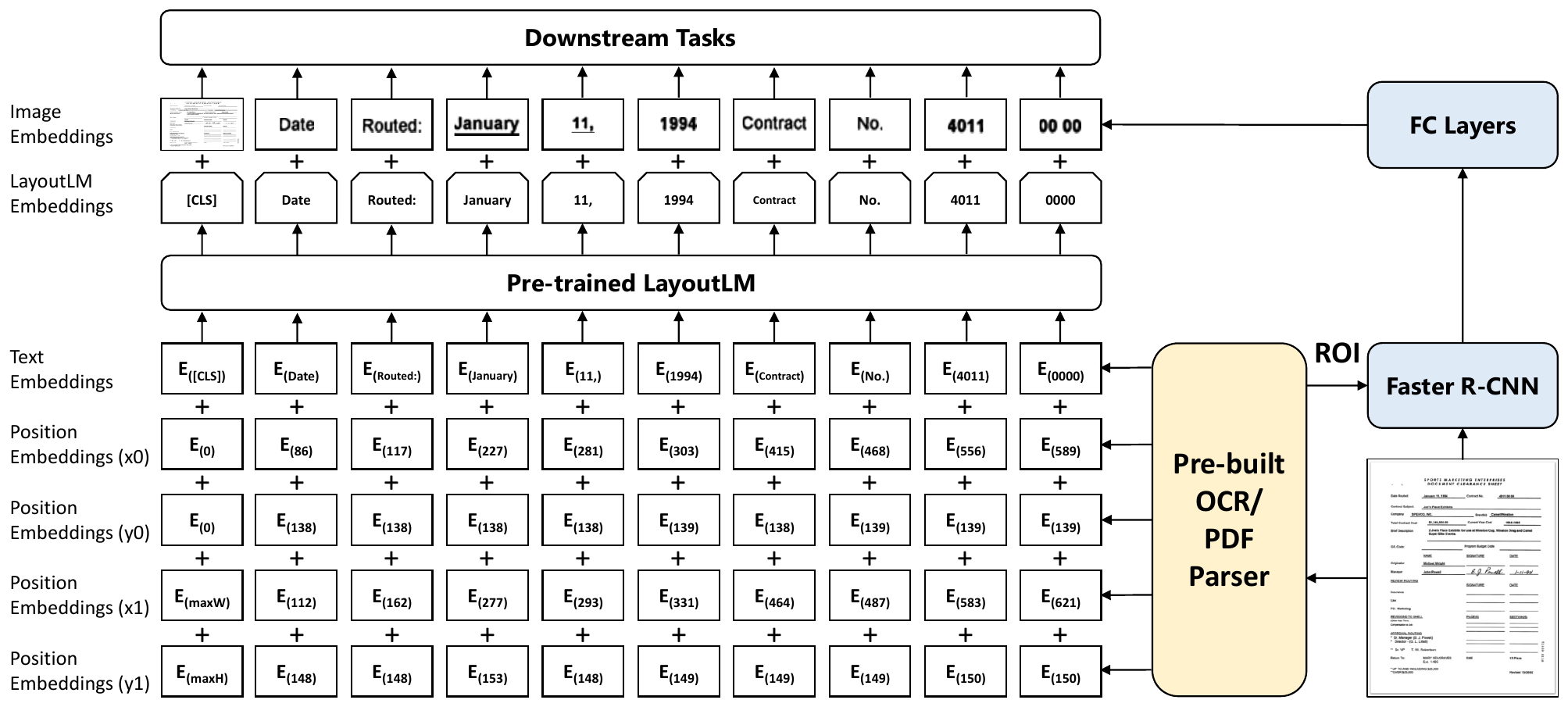
Read this figure from the bottom up. Each column is a token, from [CLS] to 0000; the five rows at the bottom are the text embedding and the four position embeddings x0, y0, x1 and y1, stacked with plus signs and fed into the "Pre-trained LayoutLM" in the middle. You can see that Routed:, January and 11, all have a y0 of 138, so they sit on the same line, while x0 keeps growing to the right, 117, 227 and onward.
The top half and the right side of the figure are a separate path; we'll come back to it shortly.
Pretraining Tasks
With the input ready, pretraining reuses BERT's masked language modeling, which the authors rename the Masked Visual-Language Model (MVLM).
15% of the tokens are picked at random for prediction: 80% of those become [MASK], 10% become a random token, and 10% stay unchanged. Crucially, a masked word keeps its coordinates.
Back to the receipt. Suppose 12 has been replaced with [MASK]. The model sees an unknown token at , on the same line as total, at the far right, with $ before it and . and 50 after it. The text context alone suggests a number goes here; add the position, and the model can pick up layout regularities such as "on a form's bottom line, the cell to the right of TOTAL usually holds an amount."
The second task is Multi-label Document Classification (MDC). Every document in the pretraining data comes with metadata labels, and the authors use those labels to supervise the [CLS] representation, hoping the model learns document-level features. The authors themselves are quite cautious about it, noting that the task needs labels, which not every large dataset has, and that future large models might not use it.
11 Million Pages of Tobacco Documents
The pretraining data is the IIT-CDIP Test Collection 1.0: more than 6 million documents and over 11 million pages of scanned images, covering letters, memos, emails, forms, handwritten notes, invoices, advertisements, budgets, news articles, presentations, scientific papers, questionnaires, résumés and more.
These documents come from the US tobacco litigation. The 1998 settlement agreement required the tobacco companies to make huge numbers of internal documents public; these were later collected in the University of California, San Francisco's Legacy Tobacco Documents Library, and the Illinois Institute of Technology (IIT) and others compiled this test collection from it, deliberately keeping the "dirty" documents with handwriting and stains. The four examples the paper chose come from here too; the mouse toxicity table from Lorillard's organic chemistry division and the event information sheet for Newport (a Lorillard cigarette brand) are both tobacco company internal documents.
IIT-CDIP's XML files hold only OCR text, no coordinates. The authors ran all the images through the open-source Tesseract again to get each word's box, stored in hOCR format.
On top of that, RVL-CDIP, one of the downstream tasks, was itself drawn from IIT-CDIP, and FUNSD's forms in turn come from RVL-CDIP. The official README notes that the overlap with downstream data was removed from the pretraining data; the main text of the paper never says so.
As for the model, BASE has 12 layers, 768 dimensions and 12 attention heads, about 113M parameters, and apart from the newly added 2-D position embeddings, everything is initialized from BERT-base; LARGE has 24 layers, 1024 dimensions and 16 heads, about 343M parameters, initialized from BERT-large. Training used 8 V100 32GB GPUs with a total batch size of 80; one epoch over the 11 million pages took 80 hours for BASE and nearly 170 hours for LARGE.
The Image Joins Only at Fine-Tuning
Besides position, the authors also wanted to use how a word looks, such as bold, underline and italics, along with the overall look of the page. They take the OCR word boxes as RoIs and pull each word's region features out of a Faster R-CNN (ResNet-101 backbone, pretrained on Visual Genome), using them as that token's image embedding; for [CLS], the whole page is the RoI.
This image branch takes no part in pretraining. It is attached to LayoutLM's output only at the fine-tuning stage. So all LayoutLM really learns in pretraining is text and coordinates. With the image branch added, the model grows from 113M parameters to 160M.
The code for this branch was never released. On GitHub, issue #249, "Faster RCNN laid out in Paper not in Repo," has been open since September 2020. In January 2021, a maintainer replied in #285 that "in LayoutLM 1.0, image embeddings are not pre-trained, so you may add any pre-trained image embeddings with the LayoutLM output for downstream tasks," for example from a Faster R-CNN that uses the OCR boxes as RoIs.
And yet the two most eye-catching numbers in the paper's abstract, 79.27 on FUNSD and 94.42 on RVL-CDIP, both use this branch (anyone planning to reproduce them: BYO Faster R-CNN).
Discussion
There are three downstream tasks: form understanding (FUNSD), receipt information extraction (SROIE) and document image classification (RVL-CDIP). Forms and receipts are both treated as sequence labeling, with each token predicting {B, I, E, S, O} plus an entity class; classification uses the [CLS] representation.
FUNSD: The Gap Layout Opens
FUNSD has 199 noisy scanned forms, 149 for training and 50 for testing, with entities in four classes: question, answer, header and other. This paper does only entity labeling, not linking between entities.
| Model and pretraining | Params | F1 |
|---|---|---|
| BERT-base | 110M | 0.6026 |
| RoBERTa-base | 125M | 0.6648 |
| RoBERTa-large | 355M | 0.7072 |
| LayoutLM-base, 500K pages, 6 epochs | 113M | 0.6985 |
| LayoutLM-base, 11M pages, 2 epochs | 113M | 0.7866 |
| LayoutLM-large, 11M pages, 1 epoch | 343M | 0.7789 |
| LayoutLM-base + image, 11M pages, 2 epochs | 160M | 0.7927 |
Compiled from Table 1 of the paper.
Pretrained on only 500K pages, LayoutLM-base already beats the same-sized RoBERTa-base by 3.4 points of F1 and trails RoBERTa-large, three times its size, by only 0.9 points. With the data raised to 11 million pages, F1 reaches 0.7866, nearly 8 points above RoBERTa-large.
FUNSD has only 149 forms to fine-tune on, and a text model can't learn much about layout from so little data. The authors' reading is that text-plus-layout pretraining helps most in this kind of low-resource setting; during pretraining, LayoutLM has already seen the layouts of more than ten million pages of forms and letters.
The image branch adds only 0.6 points here. LARGE even comes in slightly below BASE, though LARGE was trained for just 1 epoch and BASE for 2.
The authors also swept the data size and the number of epochs. 500K pages go from 0.6313 at 1 epoch to 0.6985 at 6 epochs; 11 million pages reach 0.7636 after a single epoch, already above the 0.7592 of 2 million pages after 6 epochs. Every setting rises monotonically with epochs, more data is always better, and nothing looks saturated yet.
Initialization matters too. BASE trained from scratch (1M pages, 6 epochs) gets only 0.6130; initialized from BERT it gets 0.7299, and from RoBERTa 0.7514. For LARGE, RoBERTa initialization is also best, at an F1 of 0.7926.
As for MDC, the paper says it brings "substantial improvements," but the numbers in the table are less upbeat. In the 1M-page, 6-epoch setting, adding MDC lifts the score from 0.7299 to 0.7372; but in the 11M-page, 1-epoch setting, MVLM alone gets 0.7636, and adding MDC drops it to 0.7475. By the next generation, LayoutLMv2, this task was gone.
SROIE: Receipts
SROIE is the ICDAR 2019 receipt competition: 626 receipts for training and 347 for testing, and from each one you extract four fields, company name, date, address and total. To rule out the effect of OCR errors, the authors train on the correct OCR results provided by the organizers.
Text-only models are already strong here; RoBERTa-large gets 0.9280. LayoutLM-large (11 million pages, 1 epoch) reaches 0.9524, 1.2 points above the 0.9402 of the leaderboard's first place at the time. Receipts look quite different from the tobacco documents used in pretraining, and the authors take this as evidence that LayoutLM also works on out-of-domain documents.
RVL-CDIP: Document Classification
RVL-CDIP has 400,000 grayscale document images in 16 classes, 25,000 per class. Traditionally this task is home turf for image models.
Text-only BERT and RoBERTa get only 89.8% to 90.1%, losing to the simplest image baseline, VGG-16, at 90.97%. With layout added, LayoutLM reaches 91.78% (BASE) to 91.90% (LARGE), beating VGG-16 and the 91.11% single model of Das et al., but still below InceptionResNetV2's 92.63% and LadderNet's 92.77%.
For classification, the authors concatenate LayoutLM's output with the whole-page image embedding, and accuracy jumps to 94.42%, above the 93.07% of the best multimodal ensemble at the time. Most of this 2.6-point jump comes from the image. The authors also mention that the model does best on the email class and worst on the form class.
Conclusion
LayoutLM changes very little. BERT's input gets two coordinate tables, and pretraining masks words but leaves their positions in place. That small change, plus 11 million pages of scanned documents, puts it more than ten points above same-sized text-only models on FUNSD.
It also leaves plenty of homework for the next generation. The coordinates are absolute positions, so the relationship between two words has to be worked out by attention from the summed vectors; the image is attached only at fine-tuning, so pretraining never sees what the page looks like at all; and the reading order is left entirely to Tesseract. The first two are exactly what LayoutLMv2 takes on next.
If you fine-tune LayoutLM, the officially released weights are uncased, so both preprocessing and inference must lowercase. Someone on GitHub got an F1 of only 0.42 on FUNSD, and the cause turned out to be a missing --do_lower_case at test time.
This first LayoutLM is under the MIT license, and a maintainer confirmed in an issue that it can be used commercially; from LayoutLMv2 on, the pretrained weights all switched to CC BY-NC-SA. The scores went up with every generation, yet the one you can put straight into a product is still the oldest.