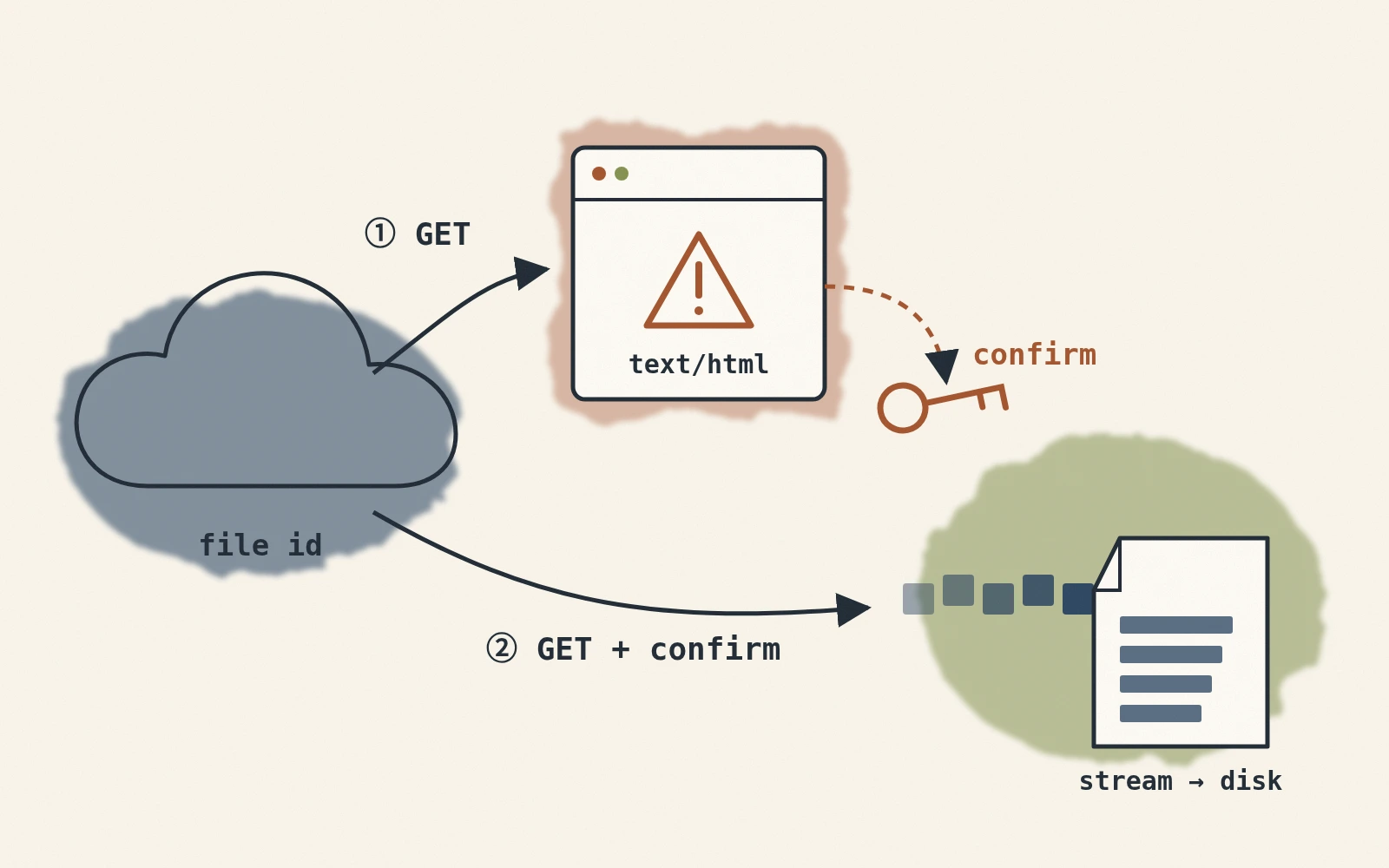
用 Python 下载 Google Drive 公开分享档案时,程式有时会把病毒扫描确认页的 HTML 存成档案。这篇整理旧站使用的两次请求流程,并说明程式应如何辨认真正的下载回应。
为什么会只下载到 HTML?
向 Google Drive 网页下载网址发送 GET 请求时,公开分享档案有时会直接回传档案内容。
某些档案会先出现病毒扫描提示页,要求浏览器确认后才开始下载。触发条件与页面格式由 Google 控制,不能用固定档案大小判断。
浏览器可以按提示页的确认按钮;程式若没有处理确认流程,就可能把 HTML 当成档案。下载后还要确认最终回应确实带有档案标头,避免写入错误页。
解题思路:二次请求
下载流程可以分成下列步骤:
- 第一次请求:带著档案 ID 对
https://docs.google.com/uc?export=download发送 GET。 - 检查回应:若 HTTP Header 带有
Content-Disposition,可以进入串流写档流程;若没有,先检查是否为下载确认页,不要直接储存成目标档案。 - 撷取验证参数:
- 从 cookies 中撷取:Google 可能在 cookie 中放置一个
download_warning_xxxxx类似的 key,里面就是 token。例如:token = session.cookies.get('download_warning_xxxxx') - 从 HTML 中撷取:有时候 Google 不会把 token 放在 cookies,而是放在 HTML 的表单里,例如:
这时候可以用 BeautifulSoup 把所有 hidden 栏位抓下来,包含
<form id="download-form" action="https://drive.usercontent.google.com/download" method="get" > <input type="hidden" name="confirm" value="t" /> ... </form>confirm或uuid等参数。
- 从 cookies 中撷取:Google 可能在 cookie 中放置一个
- 组合二次请求:带入确认参数或表单栏位再次请求,再检查 HTTP 状态与下载标头。确认页结构可能调整,这种网页解析方式只适合可公开取得的档案。需要处理私人档案或稳定的正式流程时,使用 Google Drive API 的档案下载介面 与授权凭证。
程式码实作
先安装必要套件:
pip install requests tqdm beautifulsoup4
然后使用下列 Python 函式,传入档案 ID、要保存的档名,以及下载后的目标资料夹,即可自动判断是否需要二次请求并下载成功:
import os
import re
from urllib.parse import urljoin, urlparse
import requests
from tqdm import tqdm
from bs4 import BeautifulSoup

def download_from_google(file_id: str, file_name: str, target: str = "."):
    """
    Downloads a file from Google Drive, handling potential confirmation tokens for large files.

    Args:
        file_id (str):
            The ID of the file to download from Google Drive.
        file_name (str):
            The name to save the downloaded file as.
        target (str, optional):
            The directory to save the file in. Defaults to the current directory (".").

    Raises:
        Exception: If the download fails or the file cannot be created.

    Notes:
        This function handles both small and large files. For large files, it automatically processes
        Google's confirmation token to bypass warnings about virus scans or file size limits.

    Example:
        Download a file to the current directory:
            download_from_google(
                file_id="xxxxxxxxxxxxxxxxxxxxxxxxxxxxxxxx",
                file_name="example_file.txt"
            )

        Download a file to a specific directory:
            download_from_google(
                file_id="xxxxxxxxxxxxxxxxxxxxxxxxxxxxxxxx",
                file_name="example_file.txt",
                target="./downloads"
            )
    """
    # 第一次嘗試:docs.google.com/uc?export=download&id=檔案ID
    base_url = "https://docs.google.com/uc"
    session = requests.Session()
    params = {
        "export": "download",
        "id": file_id
    }
    response = session.get(base_url, params=params, stream=True, timeout=(10, 60))

    # 如果已經出現 Content-Disposition,代表直接拿到檔案
    if "content-disposition" not in response.headers:
        # 先嘗試從 cookies 拿 token
        token = None
        for k, v in response.cookies.items():
            if k.startswith("download_warning"):
                token = v
                break

        # 如果 cookies 沒有,就從 HTML 解析
        if not token:
            soup = BeautifulSoup(response.text, "html.parser")
            # 常見情況:HTML 裡面有一個 form#download-form
            download_form = soup.find("form", {"id": "download-form"})
            if download_form and download_form.get("action"):
                # 將 action 裡的網址抓出來,可能是 drive.usercontent.google.com/download
                download_url = urljoin(response.url, download_form["action"])
                if urlparse(download_url).hostname not in {
                    "docs.google.com", "drive.google.com", "drive.usercontent.google.com"
                }:
                    raise RuntimeError("Unexpected Google Drive download host")
                # 收集所有 hidden 欄位
                hidden_inputs = download_form.find_all(
                    "input", {"type": "hidden"})
                form_params = {}
                for inp in hidden_inputs:
                    if inp.get("name") and inp.get("value") is not None:
                        form_params[inp["name"]] = inp["value"]

                # 用這些參數去重新 GET
                # 注意:原本 action 可能只是相對路徑,這裡直接用完整網址
                response = session.get(
                    download_url, params=form_params, stream=True, timeout=(10, 60))
            else:
                # 或者有些情況是直接在 HTML 裡 search confirm=xxx
                match = re.search(r'confirm=([0-9A-Za-z-_]+)', response.text)
                if match:
                    token = match.group(1)
                    # 帶上 confirm token 再重新請求 docs.google.com
                    params["confirm"] = token
                    response = session.get(
                        base_url, params=params, stream=True, timeout=(10, 60))
                else:
                    raise Exception("無法在回應中找到下載連結或確認參數,下載失敗。")

        else:
            # 直接帶上 cookies 抓到的 token 再打一次
            params["confirm"] = token
            response = session.get(base_url, params=params, stream=True, timeout=(10, 60))

    # 確保下載目錄存在
    response.raise_for_status()
    if "content-disposition" not in response.headers:
        raise RuntimeError("Google Drive did not return a downloadable file")
    if not file_name or file_name in {".", ".."} or os.path.basename(file_name) != file_name:
        raise ValueError("file_name must be a filename, not a path")

    os.makedirs(target, exist_ok=True)
    file_path = os.path.join(target, file_name)

    # 開始把檔案 chunk 寫到本地,附帶進度條
    try:
        total_size = int(response.headers.get('content-length', 0))
        with open(file_path, "wb") as f, tqdm(
            desc=file_name,
            total=total_size,
            unit="B",
            unit_scale=True,
            unit_divisor=1024,
        ) as bar:
            for chunk in response.iter_content(chunk_size=32768):
                if chunk:
                    f.write(chunk)
                    bar.update(len(chunk))

        print(f"File successfully downloaded to: {file_path}")

    except Exception as e:
        raise Exception(f"File download failed: {e}")
使用方式
假设档案 ID 为YOUR_FILE_ID,要下载为 big_model.onnx 并存在 ./models 目录下,只需要这样呼叫:
download_from_google(
    file_id="YOUR_FILE_ID",
    file_name="big_model.onnx",
    target="./models"
)
完成后,即可在 ./models 资料夹下看到成功下载的 big_model.onnx,并且能在命令列上看到下载进度。
指令列工具
或是你希望可以直接用指令列来操作,那可以加一段程式来包装一下:
from download_from_google import download_from_google
import argparse

def main():
    parser = argparse.ArgumentParser(description="Download files from Google Drive.")
    parser.add_argument("--file-id", required=True, help="Google Drive file ID.")
    parser.add_argument("--file-name", required=True, help="Output file name.")
    parser.add_argument("--target", default=".", help="Output directory. Defaults to current folder.")
    args = parser.parse_args()

    download_from_google(file_id=args.file_id, file_name=args.file_name, target=args.target)

if __name__ == "__main__":
    main()
将上述程式码储存为 download_from_google_cli.py,就可以直接在命令列执行:
python download_from_google_cli.py \
 --file-id YOUR_FILE_ID \
 --file-name big_model.onnx \
 --target ./models
若网页回应仍是确认页或错误页,程式应直接报错,避免留下副档名正确、内容却是 HTML 的档案。
原站曾以 70 MB 与 900 MB 的公开档案试跑;这只记录当时的网页行为,不能保证其他权限、档案类型或后续介面版本都相同。