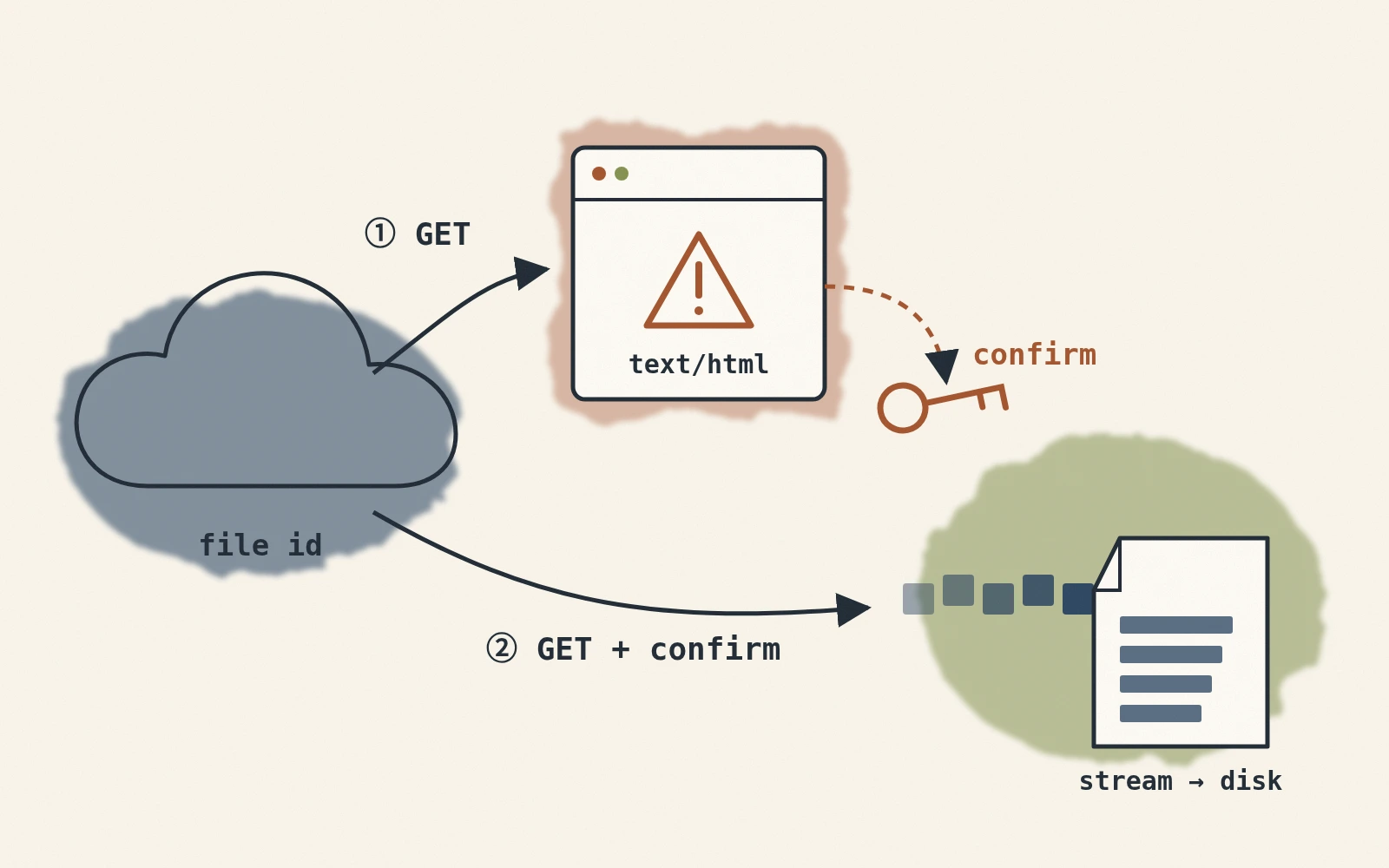
Python で Google Drive の公開共有ファイルをダウンロードすると、ウイルススキャンの確認ページを HTML として保存してしまうことがあります。この記事では、元のサイトで使った二段階のリクエストと、最後の応答がファイルであることを確かめる方法を説明します。
なぜ HTML だけがダウンロードされるのか?
Web のダウンロード URL はファイルを直接返す場合も、先に確認ページを返す場合もあります。条件やページ形式は Google 側で変わるため、固定のファイルサイズを境界として判断できません。
ブラウザでは確認ボタンを押せますが、スクリプトでは応答を処理し、保存前に最終的な HTTP 状態とダウンロード用ヘッダーを確認する必要があります。
解決方法:二回目のリクエスト
原因がわかったので、次の方法で解決できます:
- 最初のリクエスト:ファイル ID を使って
https://docs.google.com/uc?export=downloadに GET リクエストを送信します。 - 応答の確認:
Content-Dispositionがあればストリーム保存へ進みます。なければ確認ページかどうかを調べ、HTML を目的のファイルとして保存しないようにします。 - 確認トークンの取得:
- クッキーから取得:Google はクッキー内に
download_warning_xxxxxのようなキーを置き、その中にトークンが含まれている場合があります。例えば、token = session.cookies.get('download_warning_xxxxx') - HTML から取得:場合によっては Google がトークンをクッキーではなく HTML のフォーム内に置くことがあります。例えば:
この場合、BeautifulSoupを使ってすべての hidden フィールドを取得し、
<form id="download-form" action="https://drive.usercontent.google.com/download" method="get" > <input type="hidden" name="confirm" value="t" /> ... </form>confirmやuuidなどのパラメータを取得します。
- クッキーから取得:Google はクッキー内に
- 確認リクエスト:トークンまたはフォームの値を送信した後、HTTP 状態とダウンロード用ヘッダーを再確認します。公開ファイル向けの HTML 解析は変更される可能性があります。非公開ファイルや安定した運用では、認証付きの Google Drive API のダウンロード方法を使います。
コード実装
必要なパッケージをインストールします:
pip install requests tqdm beautifulsoup4
次に、以下の Python 関数を使用して、ファイル ID、保存するファイル名、ダウンロード後の保存先フォルダを渡すことで、二回目のリクエストが必要かどうかを自動的に判断し、ダウンロードを成功させます:
import os
import re
from urllib.parse import urljoin, urlparse
import requests
from tqdm import tqdm
from bs4 import BeautifulSoup

def download_from_google(file_id: str, file_name: str, target: str = "."):
    """
    Google Driveからファイルをダウンロードし、大きなファイルのために確認トークンを処理します。

    引数:
        file_id (str):
            Google DriveからダウンロードするファイルのID。
        file_name (str):
            ダウンロードしたファイルの保存名。
        target (str, optional):
            ファイルを保存するディレクトリ。デフォルトはカレントディレクトリ(".")。

    例外:
        Exception: ダウンロードに失敗した場合や、ファイルを作成できない場合。

    備考:
        この関数は小さなファイルと大きなファイルの両方を処理します。大きなファイルの場合、Googleの確認トークンを自動的に処理し、ウイルススキャン警告やファイルサイズ制限を回避します。

    例:
        カレントディレクトリにファイルをダウンロード:
            download_from_google(
                file_id="xxxxxxxxxxxxxxxxxxxxxxxxxxxxxxxx",
                file_name="example_file.txt"
            )

        特定のディレクトリにファイルをダウンロード:
            download_from_google(
                file_id="xxxxxxxxxxxxxxxxxxxxxxxxxxxxxxxx",
                file_name="example_file.txt",
                target="./downloads"
            )
    """
    # 最初の試み:docs.google.com/uc?export=download&id=ファイルID
    base_url = "https://docs.google.com/uc"
    session = requests.Session()
    params = {
        "export": "download",
        "id": file_id
    }
    response = session.get(base_url, params=params, stream=True, timeout=(10, 60))

    # すでにContent-Dispositionが含まれていれば、直接ファイルを取得できたことを意味します
    if "content-disposition" not in response.headers:
        # 最初にクッキーからトークンを取得
        token = None
        for k, v in response.cookies.items():
            if k.startswith("download_warning"):
                token = v
                break

        # クッキーにトークンがない場合は、HTMLから解析
        if not token:
            soup = BeautifulSoup(response.text, "html.parser")
            # よく見られるケース:HTML内にform#download-formがある
            download_form = soup.find("form", {"id": "download-form"})
            if download_form and download_form.get("action"):
                # action内のURLを取得、通常はdrive.usercontent.google.com/download
                download_url = urljoin(response.url, download_form["action"])
                if urlparse(download_url).hostname not in {
                    "docs.google.com", "drive.google.com", "drive.usercontent.google.com"
                }:
                    raise RuntimeError("Unexpected Google Drive download host")
                # すべてのhiddenフィールドを収集
                hidden_inputs = download_form.find_all("input", {"type": "hidden"})
                form_params = {}
                for inp in hidden_inputs:
                    if inp.get("name") and inp.get("value") is not None:
                        form_params[inp["name"]] = inp["value"]

                # これらのパラメータで再度GETリクエスト
                # 注意:元のactionは相対パスの可能性があるので、ここでは完全なURLを使用
                response = session.get(download_url, params=form_params, stream=True, timeout=(10, 60))
            else:
                # もしくはHTML内に直接confirm=xxxが含まれていることもある
                match = re.search(r'confirm=([0-9A-Za-z-_]+)', response.text)
                if match:
                    token = match.group(1)
                    # confirmトークンを含めて再度docs.google.comにリクエスト
                    params["confirm"] = token
                    response = session.get(base_url, params=params, stream=True, timeout=(10, 60))
                else:
                    raise Exception("レスポンス内でダウンロードリンクまたは確認パラメータが見つかりませんでした。ダウンロード失敗。")

        else:
            # クッキーから取得したトークンを使って再リクエスト
            params["confirm"] = token
            response = session.get(base_url, params=params, stream=True, timeout=(10, 60))

    # ダウンロード先のディレクトリが存在するか確認
    response.raise_for_status()
    if "content-disposition" not in response.headers:
        raise RuntimeError("Google Drive did not return a downloadable file")
    if not file_name or file_name in {".", ".."} or os.path.basename(file_name) != file_name:
        raise ValueError("file_name must be a filename, not a path")

    os.makedirs(target, exist_ok=True)
    file_path = os.path.join(target, file_name)

    # ファイルをchunkごとにローカルに書き込み、進行状況バーを表示
    try:
        total_size = int(response.headers.get('content-length', 0))
        with open(file_path, "wb") as f, tqdm(
            desc=file_name,
            total=total_size,
            unit="B",
            unit_scale=True,
            unit_divisor=1024,
        ) as bar:
            for chunk in response.iter_content(chunk_size=32768):
                if chunk:
                    f.write(chunk)
                    bar.update(len(chunk))

        print(f"ファイルが正常にダウンロードされました: {file_path}")

    except Exception as e:
        raise Exception(f"ファイルのダウンロードに失敗しました: {e}")
使用方法
ファイル ID がYOUR_FILE_IDで、big_model.onnxという名前で./modelsフォルダに保存する場合、以下のように呼び出します:
download_from_google(
    file_id="YOUR_FILE_ID",
    file_name="big_model.onnx",
    target="./models"
)
完了後、./modelsフォルダにbig_model.onnxが正常にダウンロードされ、コマンドラインで進行状況が表示されます。
コマンドラインツール
コマンドラインで操作したい場合、次のようにコードを追加してラップすることができます:
from download_from_google import download_from_google
import argparse

def main():
    parser = argparse.ArgumentParser(description="Google Driveからファイルをダウンロードします。")
    parser.add_argument("--file-id", required=True, help="Google DriveのファイルID。")
    parser.add_argument("--file-name", required=True, help="出力ファイル名。")
    parser.add_argument("--target", default=".", help="出力ディレクトリ。デフォルトはカレントディレクトリ。")
    args = parser.parse_args()

    download_from_google(file_id=args.file_id, file_name=args.file_name, target=args.target)

if __name__ == "__main__":
    main()
このコードをdownload_from_google_cli.pyとして保存すれば、次のようにコマンドラインから実行できます:
python download_from_google_cli.py \
 --file-id YOUR_FILE_ID \
 --file-name big_model.onnx \
 --target ./models
最終応答が HTML やエラーページのままなら、スクリプトは失敗として扱います。元のサイトでは 70 MB と 900 MB の公開ファイルで試していますが、権限、ファイル形式、後のページ版でも同じ動作になる保証はありません。