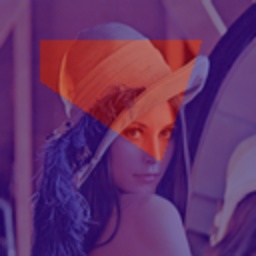
draw_mask
-
Dependencies
- Install
capybara-docsaid[visualization]first.
- Install
-
Description: Draws a mask on an image.
-
Parameters
- img (
np.ndarray): The image to draw on. - mask (
np.ndarray): The mask to draw. - colormap (
int): The colormap to apply to the mask. Defaults tocv2.COLORMAP_JET. - weight (
tuple[float, float]): The weights for the image and the mask. Defaults to (0.5, 0.5). - gamma (
float): The gamma value for the mask. Defaults to 0. - min_max_normalize (
bool): Whether to normalize the mask to the range [0, 1]. Defaults to False.
- img (
-
Returns
- np.ndarray: The image with the mask overlay.
-
Example
import cv2
import numpy as np
from capybara import Polygon, imread
from capybara.vision.visualization.draw import draw_mask, draw_polygon

img = imread('lena.png')
polygon = Polygon([(20, 20), (100, 20), (80, 80), (20, 40)])
mask = draw_polygon(np.zeros_like(img), polygon, fillup=True, color=255)
mask_img = draw_mask(
    img,
    mask,
    colormap=cv2.COLORMAP_JET,
    weight=(0.5, 0.5),
    gamma=0,
    min_max_normalize=False,
)