Original paper
Segment Everything Everywhere All at Once
- Publication
- NeurIPS 2023Conference
- First submitted to arXiv
- arXiv:2304.06718
Cite this paper · BibTeX
The citation identifies the linked source version. It cites the original paper and its authors.
@misc{segmentationseem2023,
  title = {{Segment Everything Everywhere All at Once}},
  author = {Xueyan Zou and Jianwei Yang and Hao Zhang and Feng Li and Linjie Li and Jianfeng Wang and Lijuan Wang and Jianfeng Gao and Yong Jae Lee},
  year = {2023},
  eprint = {2304.06718},
  archivePrefix = {arXiv},
  url = {https://arxiv.org/abs/2304.06718}
}
In April 2023, three models that could "segment anything" appeared within just eight days. Meta's SAM takes points and boxes as prompts, BAAI's SegGPT takes example images as prompts, and the third was SEEM, from Microsoft and the University of Wisconsin. Its title borrows from Everything Everywhere All at Once, which won the Oscar for Best Picture that year.
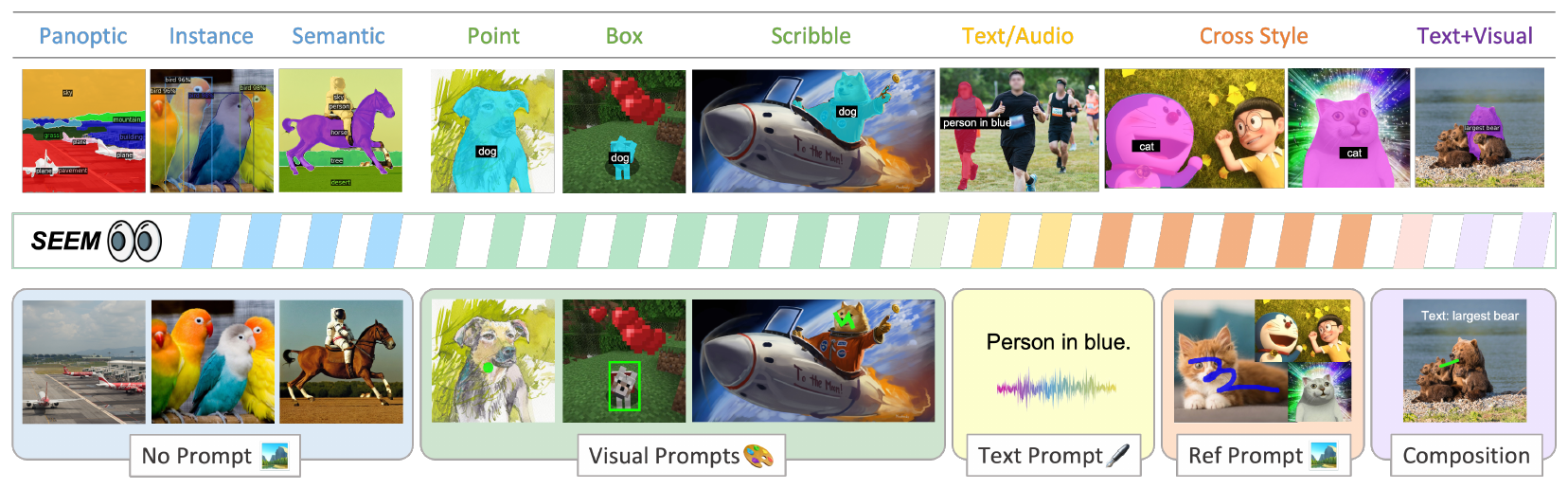
SEEM wants to be a segmentation interface that works more like ChatGPT. You can click once, draw a box, scribble a couple of strokes, type a sentence, even use a region from another image as a reference, or mix any of these together; and whatever it segments should come labeled with what it is.
The authors are Xueyan Zou and Yong Jae Lee of the University of Wisconsin, Jianwei Yang, Jianfeng Gao and others at Microsoft, and Hao Zhang and Feng Li of the Hong Kong University of Science and Technology. SEEM builds on their earlier X-Decoder.
Defining the Problem
Segmentation research had been advancing in three directions. One was from closed sets of classes to open vocabulary, using text and models like CLIP to recognize things never seen before; another was from fixed class names to free-form referring expressions, such as "the person in blue"; the third was from producing the output in one go to interactive segmentation, where the user corrects the result click by click, round after round.
But these abilities were scattered across different models. SimpleClick and RITM, for interactive segmentation, take clicks; LAVT, for referring segmentation, takes text; and Mask2Former, for generic segmentation, takes nothing at all and simply outputs everything. On the language side there had long been LLMs, single models that handle all kinds of instructions, yet segmentation still had no general-purpose interface.
The authors set four requirements for this interface:
- Versatility. Points, boxes, scribbles, polygons, masks, and even a region in another image should all work as prompts.
- Compositionality. Text and visual prompts can be mixed and complement each other.
- Interactivity. It remembers the results of earlier rounds and can be corrected round by round.
- Semantic-awareness. Every segment it cuts out comes with a class name.
The last point is the one SEEM specifically holds up against SAM. SAM produces very good masks, but it has no idea what it has segmented.
Solving the Problem
Every Prompt in One Space
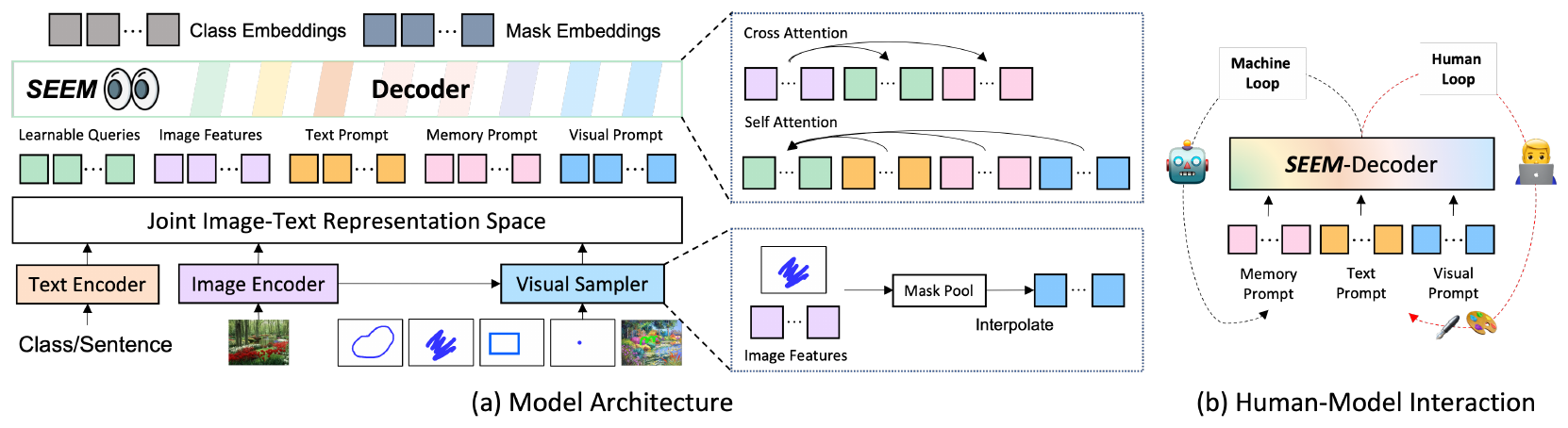
SEEM's skeleton is a standard encoder–decoder, the same as Mask2Former and X-Decoder. The image encoder extracts features , and a set of learnable queries passes through the decoder, which outputs mask embeddings and class embeddings . The former take a dot product with the pixel features to give masks, and the latter are compared with text embeddings to give classes.
What's new is three kinds of prompts: text prompts , visual prompts and memory prompts .
Inside the decoder, the queries and these prompts interact through self-attention.
Visual Prompts: Sampling Points from the Feature Map
Start with the non-text inputs, such as points, boxes and scribbles.
Earlier interactive segmentation took one of two approaches. One draws the clicks as a mask and feeds it into the backbone together with the image, but then every click means rerunning the whole backbone, which is too slow. The other is SAM's, with a separate encoder for each kind of prompt (points, boxes), which is stuck as soon as a new form of prompt comes along.
SEEM handles all of them with a single "visual sampler":
is the location the user specifies (a point, box, scribble or polygon), and is the image features. From the region the user specifies, the sampler uniformly interpolates feature vectors at up to 512 points and uses them as the visual prompt. A point, a box or a scribble all end up as a set of feature vectors; only the sampling locations differ.
doesn't have to be the features of the target image; it can come from another image. So "circle a dog in image A and find the same thing in image B" is handled by the same mechanism.
These visual prompts come from the image features, and throughout training on panoptic and referring segmentation, the image features are kept aligned with text in the same space. So, the authors say, the visual prompts end up naturally aligned with the text prompts.
Composition: Matching Separately
Training runs into a snag. Training data usually carries only one kind of prompt at a time, either no prompt (panoptic segmentation), only text (referring segmentation) or only clicks (interactive segmentation). And visual and text prompts do come from different encoders, so their embedding spaces still differ.
The authors' fix is to match them separately. Visual prompts are matched against the queries' mask embeddings, and text prompts against the queries' class embeddings:
is the IoU between the predicted mask and the annotation. Visual prompts come from image features to begin with, so pairing them with mask embeddings is more natural; text prompts come from the text encoder, so pairing them with class embeddings is more natural. The authors say this works better than matching everything with just one of the two embeddings.
During training, the queries are duplicated into three sets (generic, referring, interactive) that share weights, and each set interacts only with the prompts of its own task. At inference, the queries interact with all prompts together, so text and visual prompts can simply be concatenated and fed in, even though the model was never trained that way.
Memory Prompts: Remembering the Last Round
Interactive segmentation usually takes several rounds. SEEM carries the previous round's result into the current one with a few "memory prompts," without any extra encoding network:
is the previous round's mask. The memory prompts do cross-attention with the image features only within the area of the previous round's mask (Mask2Former's masked attention), then pass the history on to the other prompts through self-attention.
Because every prompt goes only into the decoder, multi-round interaction computes the image features once, and each round runs only the lightweight decoder. The authors specifically point out that this is more efficient than approaches like SimpleClick, which rerun the backbone every round.
Training
SEEM trains three tasks at once: panoptic, referring and interactive segmentation. Panoptic and interactive segmentation use COCO 2017's panoptic annotations (107K images after removing the overlap with the RefCOCOg validation set), and referring segmentation uses RefCOCO, RefCOCOg and RefCOCO+. The backbone comes in three sizes, FocalNet-T and the d3 and d5 versions of DaViT; the text encoder is UniCL's or Florence's.
Discussion
One Model, Three Tasks
The same set of weights on all three tasks (Table 1 of the paper):
| Model | Training data | COCO PQ | RefCOCOg cIoU | VOC 5-NoC90 |
|---|---|---|---|---|
| Mask2Former (L) | COCO | 57.8 | — | — |
| X-Decoder (L) | COCO | 56.9 | 64.6 | — |
| SegGPT (L) | Several datasets | 34.4 | — | — |
| SAM (H) | SA-1B, 11M images | — | — | 1.98 |
| SEEM (L) | COCO + LVIS, 120K images | 57.5 | 65.6 | 1.71 |
NoC@90 is an interactive segmentation metric. With simulated user clicks (each placed at the center of the region with the largest error), it counts how many clicks it takes to reach 90% IoU; lower is better. 5-NoC90 is the version capped at 5 clicks.
On generic segmentation, SEEM is about level with the specialized Mask2Former (57.5 vs. 57.8) and more than 20 points above SegGPT, which also bills itself as general-purpose. On interactive segmentation, SEEM (L) needs 0.27 fewer clicks than SAM (H), even though SAM's training data is nearly 100 times SEEM's. That is where the abstract's "minimum 1/100 supervision" comes from.
Combined prompts make a clear difference too. In referring segmentation, adding a visual prompt on top of the text lifts the smallest model, SEEM-T, from 60.9 to 70.4 cIoU, nearly 10 points, and the larger models keep a similar gap.
Prompt Types
The authors also compared mIoU after a single click (or a single stroke) across different prompt types (Table 2 of the paper):
| Model | Dataset | Point | Stroke | Scribble | Polygon | Box |
|---|---|---|---|---|---|---|
| SAM (H) | COCO | 65.0 | 27.7 | 30.6 | 37.8 | 50.4 |
| SEEM (L) | COCO | 83.4 | 84.6 | 84.1 | 76.5 | 76.9 |
| SAM (H) | ADE20K | 58.4 | 20.4 | 22.2 | 28.3 | 58.5 |
| SEEM (L) | ADE20K | 65.5 | 66.6 | 66.3 | 58.1 | 54.1 |
SAM drops sharply on anything other than points and boxes, scoring only in the 20s and 30s on strokes and scribbles, because its prompt encoder was never trained on those forms. SEEM's visual sampler doesn't care what the prompt looks like, and its scores are close across all forms.
Read this table with care, though. SEEM was trained on COCO, so the COCO rows are its home turf and the gap is naturally large. On ADE20K, the gap for clicks shrinks to about 7 points, and with box prompts SAM does better (58.5 vs. 54.1).
Video Segmentation Without Ever Seeing Video
SEEM's reference-image prompt also lets it do video object segmentation on the side. It uses the first frame's mask as the reference and segments every frame after it. Its training data contains no video at all, and no paired images either. On DAVIS 2017, SEEM-B gets a J&F of 62.8 (Table 3 of the paper).
That's well below SegGPT (75.6), which came out at the same time and also wasn't trained on video, about the same as PerSAM (60.3), which is built on SAM, and further still from dedicated video models. One slightly odd detail is that the largest model, SEEM-L, scores lower than SEEM-B (58.9).
Conclusion
SEEM turns points, boxes, scribbles, text and reference images, all these different forms of prompt, into prompt vectors in the same space and hands them to a single decoder. Visual prompts are sampled from the image features and matched separately from text prompts; the history of the interaction is carried along by a few memory prompts; and the output always comes with a class name.
Within COCO, the territory it was trained on, a single SEEM handles generic, referring and interactive segmentation at once, approaching or beating specialized models at each. Outside COCO, the advantage is less one-sided. On ADE20K it loses to SAM with box prompts, and in zero-shot video segmentation it loses to SegGPT.
It suits interactive annotation tools best. The image is encoded once, the user can click, draw or type and correct the result round by round, and when it's done it tells you what it cut out. If all you need is "one click, accurate mask," SAM's generalization, trained on far more data, is probably still the more reliable choice.