Original paper
Image Segmentation Using Text and Image Prompts
- Publication
- CVPR 2022Conference
- First submitted to arXiv
- arXiv:2112.10003
Cite this paper · BibTeX
The citation identifies the linked source version. It cites the original paper and its authors.
@misc{segmentationclipseg2021,
  title = {{Image Segmentation Using Text and Image Prompts}},
  author = {Timo Lüddecke and Alexander S. Ecker},
  year = {2021},
  eprint = {2112.10003},
  archivePrefix = {arXiv},
  url = {https://arxiv.org/abs/2112.10003}
}
An ordinary segmentation model decides at training time what it can segment. ADE20K has 150 classes, so the model learns those 150; if you later want to add a "trash can," you have to collect data and train again.
In early 2021, CLIP trained a shared image–text embedding space on 400 million image–text pairs, in which any piece of text can be compared with any image for similarity. Timo Lüddecke and Alexander Ecker of the University of Göttingen in Germany wondered whether CLIP's ability to "recognize a little of everything" could be extended to segmentation.
The CLIPSeg they built accepts an arbitrary prompt at test time, either a piece of text ("a car with wheels") or an example image, and outputs a binary segmentation map marking the regions of the image that match the prompt. It later became one of the go-to tools on Hugging Face for "turning a sentence into a mask."
Defining the Problem
Before CLIPSeg, getting a segmentation model to handle "things it never saw in training" fell roughly into three lines of research, each with its own limits:
- Generalized zero-shot segmentation. At test time the model has to segment both seen and unseen classes, usually by linking the unseen classes to seen ones through word vectors or WordNet.
- One-shot segmentation. Besides the image to segment, the model gets an example image and its mask, telling it "find the thing that looks like this."
- Referring expression segmentation. The target is described in free-form text, such as "the person on the left wearing a hat," but every class has been seen during training.
The three tasks take different inputs, are evaluated differently, and each has its own models. CLIPSeg wants a single model, trained once, to do all three: the prompt can be text or an image, there's no fixed list of classes, and the model has to be able to answer "that thing isn't in the image."
Solving the Problem
A Frozen CLIP Plus a Small Decoder
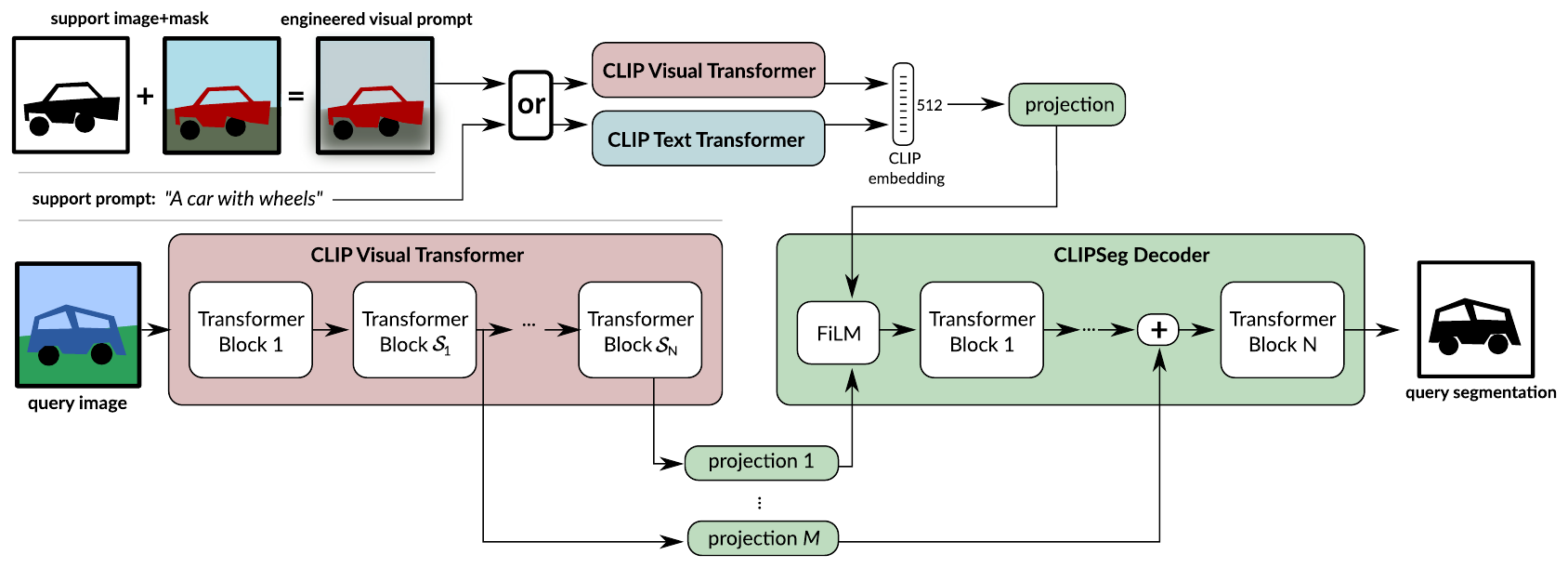
CLIPSeg's backbone is CLIP's ViT-B/16, kept entirely frozen; only the green parts of the figure are trained. The authors' reasoning is to keep the biases of segmentation datasets from overriding CLIP's original broad recognition ability as far as possible.
We'll walk through it at the paper's training size of 352×352.
Query image. The 352×352 image is cut into 16×16 patches, of them, which go into CLIP's visual Transformer together with a CLS token. CLIPSeg takes one set of activations each from layers 3, 7 and 9 (485 tokens per set) and projects each to dimensions.
Conditional vector. "What to segment" is decided by a conditional vector. If the prompt is text, it's encoded with CLIP's text Transformer; if the prompt is an example image, it's encoded with CLIP's visual Transformer. Both land in CLIP's shared 512-dimensional embedding space, so the same decoder can take either kind of prompt.
Decoder. The decoder has only 3 Transformer blocks, one for each of the 3 layers of CLIP activations taken out. Before each block, the corresponding CLIP activations are added in, a bit like U-Net's skip connections. The conditional vector is injected with FiLM: a set of scale and shift parameters is computed from the conditional vector and adjusts the decoder's input channel by channel. A final linear projection maps each token back to 16×16 pixels, which are tiled into the 352×352 segmentation map.
The whole trainable part has only 1,122,305 parameters, about 4MB as a file.
Training Data: PhraseCut+
The training data is PhraseCut, a dataset of more than 340,000 phrases with their corresponding segmentations. Originally each phrase had only text, and the authors extended it in two ways:
- Visual samples. For each phrase, one image is drawn at random from the other samples with the same phrase and used as the example image. If a phrase appears only once, only the text is used.
- Negative samples. With some probability, a sample's phrase is swapped for an unrelated one; the correct answer is then an all-black mask, which teaches the model to say "nothing here."
The authors added one more small trick, mixing the two kinds of prompt in CLIP's embedding space:
is the embedding of the example image and the embedding of the text; each time, an is drawn at random to mix them linearly, as data augmentation. This way the same model sees text, images and every combination in between. The extended version is called PhraseCut+, PC+ for short.
How to Show CLIP an Example Image
When an example image is the prompt, it usually contains more than the target object, so how do you tell CLIP "I mean the one the mask outlines"?
Conventional convolutional one-shot segmentation uses masked pooling, multiplying the mask onto the feature map and then pooling. That trick doesn't work on a Transformer. Most of CLIP's semantics accumulate in the CLS token rather than in the feature map, and bypassing the CLS token to pool straight from the feature map would break compatibility with the text embeddings.
So the authors ran a small experiment that needs no training, comparing ways of "marking the target on the image" to see which one best lets CLIP recognize the target.
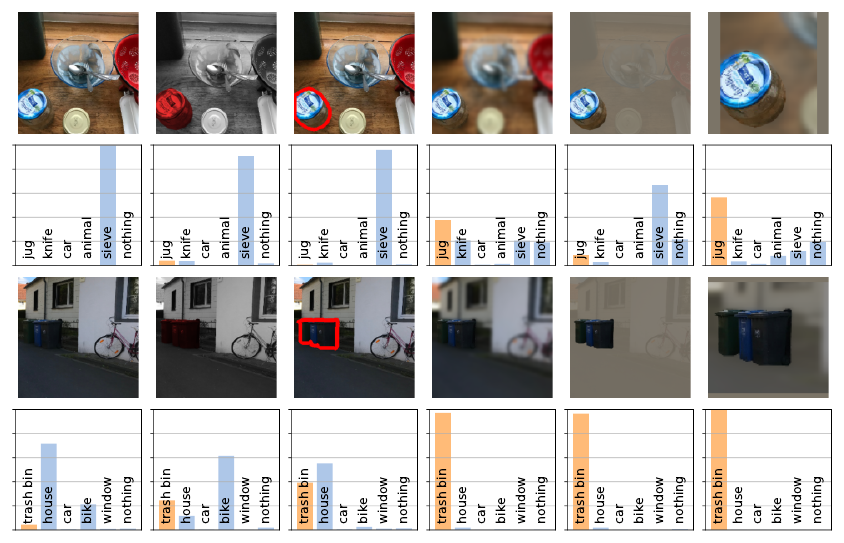
They drew 1,600 images from LVIS, marked one target object in each, and used the original CLIP to measure how much the probability of the target class rose with the marking compared with without it (Table 2 of the paper):
- Masking attention inside CLIP: only 1.3 to 1.7 more; masking all tokens actually drops it by 14.4.
- Drawing a red box on the image or coloring the object red: only 1.2 to 2.3 more.
- Dimming the background to 10%: 13.9 more; to fully black: 23.4 more.
- Cropping to the target region: 13.6 more; cropping plus blurring and darkening the background: 23.5 more, the best combination.
Darken and blur the background, then crop to around the object, and CLIP understands best what you're after. The one-shot experiments build their prompts this way.
Discussion
How Each of the Three Tasks Went
The authors trained several versions: a text-only CLIPSeg (PC), a general-purpose CLIPSeg with text plus images (PC+), and two baselines. CLIP-Deconv uses the same CLIP, but its decoder is reduced to FiLM, a linear projection and one deconvolution; ViTSeg has the same architecture as CLIPSeg, but its visual backbone is swapped for an ImageNet-pretrained ViT.
Referring expression segmentation (PhraseCut, Table 3 of the paper). CLIPSeg (PC) gets 46.1 mIoU, and 48.2 with the decoder enlarged to , both above the two-stage HULANet (41.3). They fall well short of MDETR's 53.7, though; the authors point out that MDETR works at full resolution and received two rounds of fine-tuning on PhraseCut. ViTSeg, also trained on text only, gets just 38.9, showing how much CLIP's pretraining matters.
Generalized zero-shot segmentation (Pascal VOC, Table 4 of the paper). For training, the Pascal classes, along with their WordNet hyponyms (such as the various dog breeds), are all removed from PhraseCut. In the setting with 10 unseen classes, CLIPSeg gets 35.7 mIoU on the seen classes and 43.1 on the unseen ones. For the other methods it's the other way around; OSR, for example, gets 72.1 on seen classes and only 33.9 on unseen ones. The authors stress that this isn't a like-for-like comparison. The other methods are trained only on 10 or 16 Pascal classes, while CLIPSeg uses CLIP plus PhraseCut and has learned far more.
One-shot segmentation (Pascal-5i, Table 5 of the paper). CLIPSeg (PC+) gets 59.5 mIoU, about the same as PFENet (60.2) and RePRI (59.7), but below HSNet (64.0), which was designed specifically for one-shot. The gap is larger on COCO-20i, where CLIPSeg gets 33.2 and HSNet 39.2.
Run the same evaluation with text prompts instead, and CLIPSeg reaches 72.4 on Pascal-5i, 20 points above LSeg (52.3), which also uses CLIP. For CLIPSeg, a class name works much better than an example image.
"Something to Sit On"
The most interesting thing about CLIPSeg is that it can handle kinds of prompts that aren't in its training data.
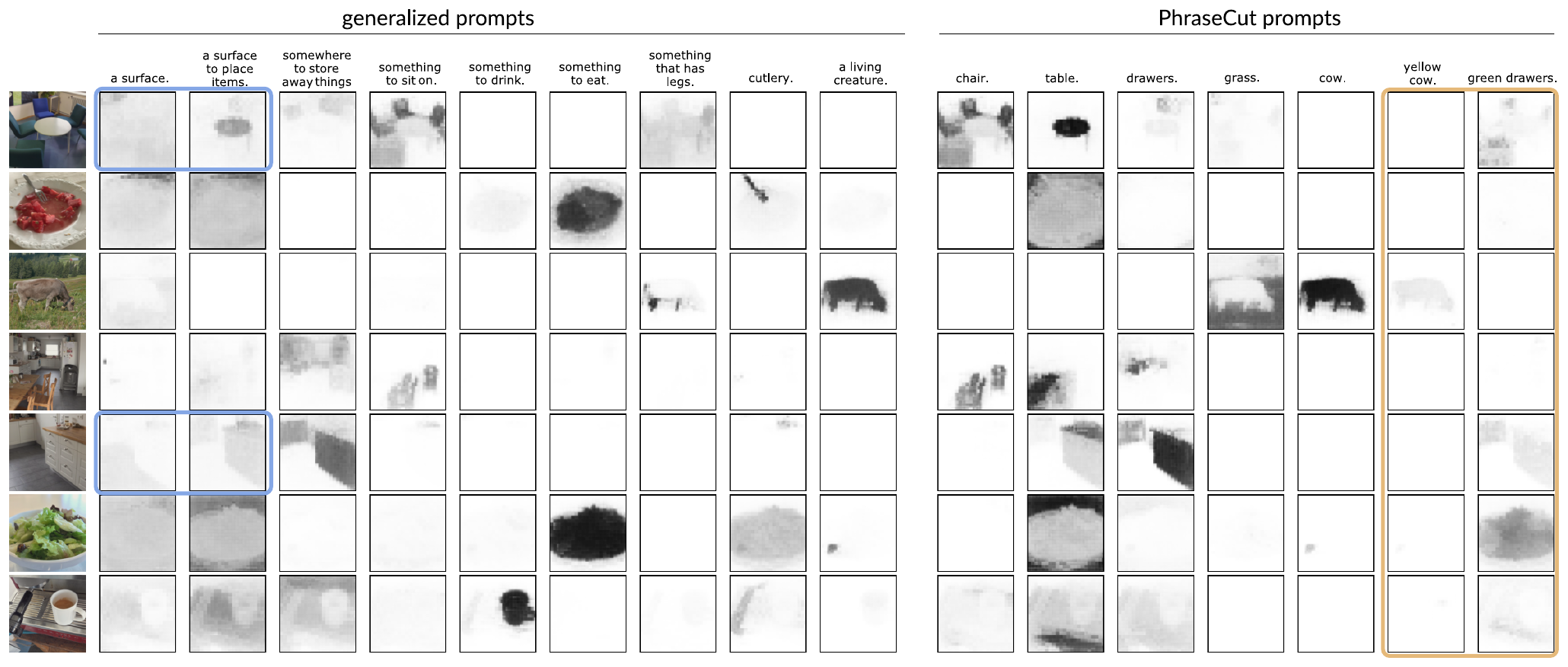
The prompts in the left half, like "something to sit on," "something to store away things" and "a living creature," describe functions or attributes. PhraseCut has no phrases like these, yet CLIPSeg gets most of them right. It makes mistakes too; the authors themselves point out a bug in a salad that was taken for a cow. In the orange boxes on the right are prompts with the wrong color, such as "yellow cow," and the model's predicted probabilities drop noticeably, showing that it really does look at color.
The authors also built a quantitative version from the LVIS test set (Table 8 of the paper), turning functions ("sit on," mapped to chairs and sofas), attributes and part relations into prompts. Compared with a version trained only on LVIS object names, the PC+ version is clearly better on attributes and parts (mIoU 26.6 vs. 18.4 and 25.7 vs. 18.9), while on functions the two are about the same (36.9 vs. 37.7). A model that has seen only object names has a harder time matching descriptions like "yellow" or "part of something" to the image.
Ablations
Ablations on PhraseCut (Table 9 of the paper):
| Setting | Text mIoU | Image mIoU |
|---|---|---|
| CLIPSeg (PC+) | 43.6 | 25.4 |
| No CLIP pretraining | 13.1 | 12.7 |
| No image prompts in training | 46.4 | 14.4 |
| Decoder | 37.4 | 24.7 |
| Layer-3 activations only | 31.9 | 21.5 |
CLIP's pretrained weights are the foundation of the whole method; with random weights, only 13 points are left. Taking activations only from the shallow layer costs a lot, which shows that CLIP's deeper semantics are useful for segmentation. Adding image prompts during training lowers the text-prompt score by 2.8 in exchange for image prompts rising from 14.4 to 25.4, the price of "one model for everything."
Blocky Masks
Anyone who has used CLIPSeg notices that its masks are coarse. The last layer linearly projects each token straight into 16×16 pixels, and a 352×352 input has only 22×22 tokens, so the edges naturally come out blocky.
In September 2022 the authors released a new set of weights, rd64-uni-refined, which replaces the final transformation with a more complex deconvolution module. According to the official README, these weights give more refined predictions, without the "square-like" results of the other weights. Two months later CLIPSeg was integrated into Hugging Face Transformers, and as of November 2026 the refined weights there still get around 300,000 downloads a month.
Conclusion
With a frozen CLIP and a decoder of just over a million parameters, CLIPSeg made a segmentation model that accepts any text or image prompt at test time. On three tasks that used to be separate, its results are decent on each but best on none. It loses to MDETR on referring expressions and to HSNet on one-shot, and on zero-shot the comparison isn't even made under the same conditions.
Its value is flexibility. It can segment "something to sit on," which isn't in its training data; anything you can describe in a sentence, it has a chance of segmenting. This idea of "saying in words what to segment" later developed all the way into Grounded SAM and SAM 3.
If you need to turn a sentence into a rough mask quickly, as a starting point for image editing or data annotation, CLIPSeg is light and easy to use. When you load the weights, pick the refined version, or the edges will come out as a grid of little squares.