Original paper
DocLayNet: A Large Human-Annotated Dataset for Document-Layout Analysis
- Publication
- KDD 2022Conference
- First submitted to arXiv
- arXiv:2206.01062
Cite this paper · BibTeX
The citation identifies the linked source version. It cites the original paper and its authors.
@misc{documentunderstandingdoclaynet2022,
  title = {{DocLayNet: A Large Human-Annotated Dataset for Document-Layout Analysis}},
  author = {Birgit Pfitzmann and Christoph Auer and Michele Dolfi and Ahmed S Nassar and Peter W J Staar},
  year = {2022},
  eprint = {2206.01062},
  archivePrefix = {arXiv},
  url = {https://arxiv.org/abs/2206.01062}
}
PubLayNet, from IBM Research Australia, matched PDFs against XML to label 360,000 pages automatically, without a single box drawn by hand. The price was that all 360,000 pages were biomedical papers from PubMed.
A detector that scored 0.9 mAP on PubLayNet dropped to just 0.47 zero-shot when it was switched to an insurance company's policy documents. That number comes from PubLayNet's own paper, whose authors acknowledged at the time that drawing data only from scientific literature was its biggest limitation.
Three years later, also at IBM, the Deep Search team at the Zurich research lab went the opposite way. They recruited 40 annotators, spent 12 weeks training them and three months annotating, and drew layout boxes by hand on 80,863 pages in 11 classes, from financial reports, user manuals, laws and regulations, patents, government tenders, and scientific papers.
The dataset is called DocLayNet. More interesting than the number of boxes is how much of the paper goes into explaining how hard it is to “get a group of people to label consistently.”
Defining the Problem
Layout analysis means finding every block on a document page and saying whether it is a title, a paragraph, a table, a picture, or something else. It's the first step in converting a PDF into a structured document; reading order, table recognition, and text extraction all build on it.
PubLayNet in 2019 and DocBank in 2020 gave the task large datasets, with over 300,000 and about 500,000 pages respectively. Both were generated automatically, PubLayNet by matching against PubMed's XML and DocBank against arXiv's LaTeX.
The authors point out that automation itself limits the diversity of the data. Generating annotations automatically requires a structured source file, and most PDFs simply don't have one. Where source files do exist, as at PubMed and arXiv, the documents are typeset with publisher templates, and the layouts are highly uniform. Technical manuals, corporate annual reports, legal texts, and government tenders each have their own layouts, some of them quite flashy.
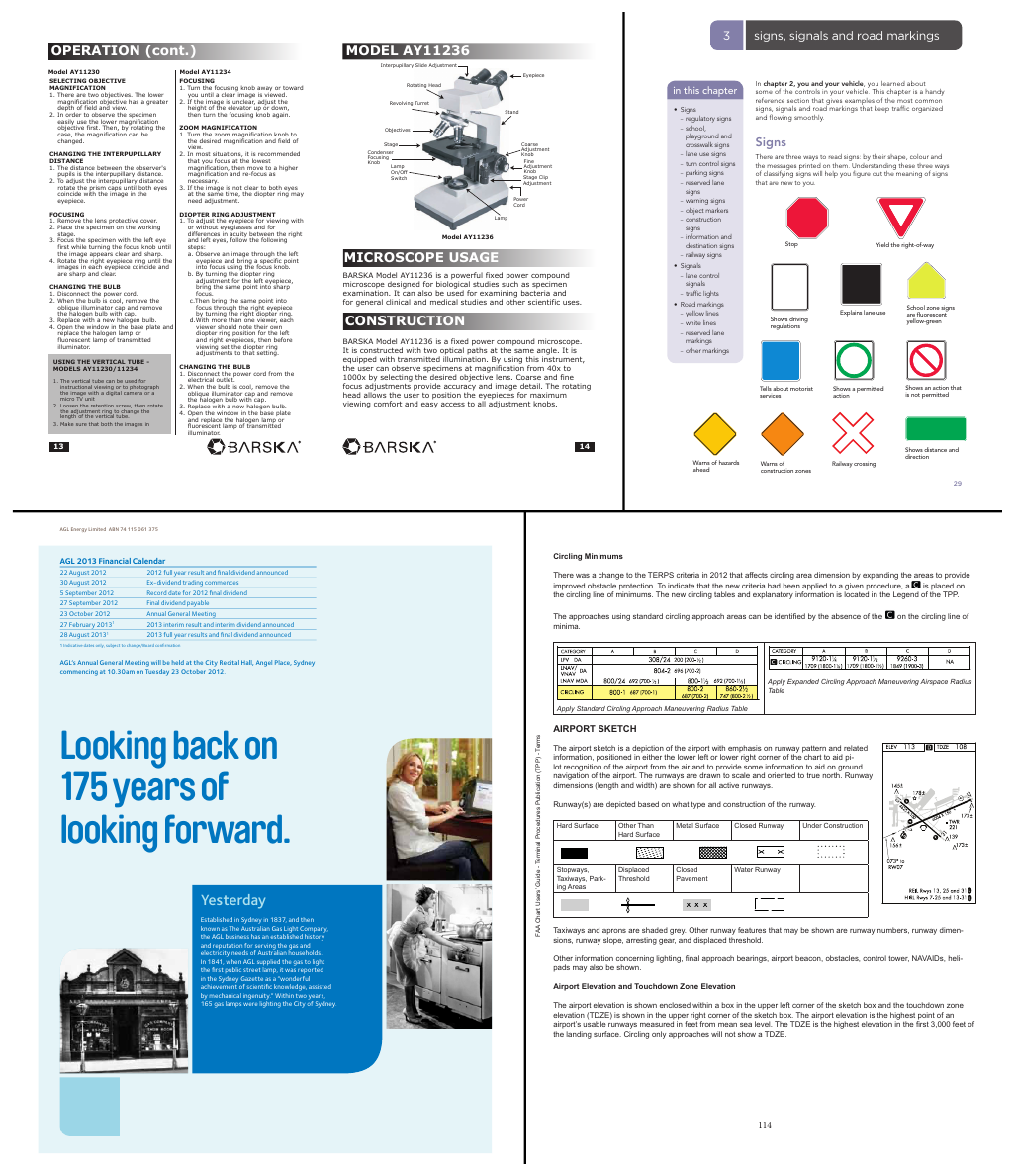
None of these four pages looks like a paper. On the annual report page at bottom left, is “Looking back on 175 years of looking forward.” a title or a paragraph? On the sign manual page at top right, are the rows of sign images and the small print beneath them pictures, captions, or a list?
Human annotation can also do something automation can't. Typesetting often relies on little tricks, such as using a table with invisible borders to lay out paragraphs in two columns, or a list without bullets to create indentation. Automated methods read the source file and treat the former as a table and the latter as a list; a person looking at the page sees paragraphs.
So the authors decided to go back to human annotation. The question is how to do human annotation at scale, and how to make sure different people produce consistent labels.
Solving the Problem
Choosing Documents
DocLayNet's documents fall into six categories: financial reports, user manuals, scientific papers, laws and regulations, patents, and government tenders. Financial reports and manuals are the two largest, and they deliberately include many free-style layouts, such as companies' annual reports; the other four categories mix sources from different websites and publishers, so that no category is stuck with a single layout style.
Several criteria guided the selection of documents:
- Clean copyright: all documents are free to use.
- As few scans as possible, since scanned pages may be skewed or rotated and can't be labeled with upright rectangles.
- A preference for technical documents of ten pages or more, the more tables, figures, and captions the better.
- Excluded: receipts, invoices, handwritten documents, and text in photos.
Language wasn't deliberately controlled. About 95% is English, and the rest includes German at 2.5%, French at 1%, Japanese at 1%, and others.
When picking pages from each document, the authors always included the cover page and otherwise favored pages with figures and tables. How did they know how many figures and tables a page had? They ran a detector trained on PubLayNet to estimate it first.
11 Classes
After reviewing the collected documents, the authors settled on 11 classes: Caption, Footnote, Formula, List-item, Page-footer, Page-header, Picture, Section-header, Table, Text, and Title. PubLayNet has only 5 classes and DocBank has 13, but neither is a superset of DocLayNet's.
Four considerations went into choosing the classes: whether a class appears often enough, whether its definition is ambiguous, whether it can be recognized from a single page (without context from surrounding pages), and whether the classes together cover everything meaningful on a page.
Two kinds of classes were deliberately excluded. One is classes specific to one type of document, such as Abstract, which only papers have; the other is classes that can only be told apart by understanding the text, such as DocBank's Author and Affiliation. The authors consider these beyond the scope of visual layout recognition, all the more so for documents other than papers.
A Hundred-Page Guideline
At first, the authors thought layout annotation was intuitive and that most pages could be labeled sensibly. When the core team tried it, they found otherwise.
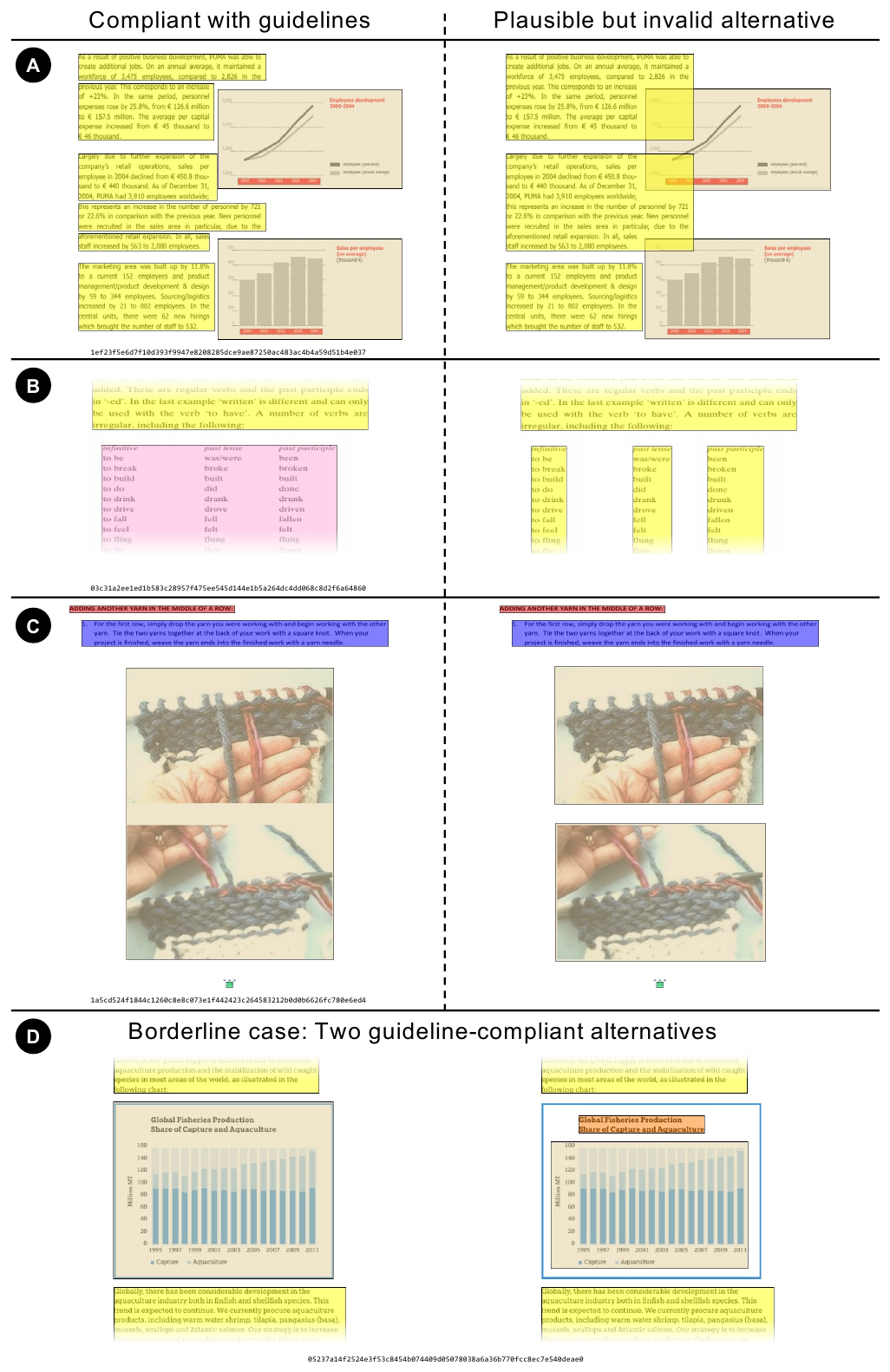
In every pair in this figure, both the left and the right are “reasonable” labelings.
- A: an annual report page. On the left, each paragraph and each chart gets its own box; on the right, someone boxed a paragraph together with the line chart beside it.
- B: a verb conjugation table. On the left, the whole table is one box; on the right, each column gets a box, like three lists.
- C: two step-by-step photos. On the left, they're merged into one picture; on the right, split into two.
- D: a bar chart. On the left, it's boxed as a picture together with the title on the chart; on the right, the title is boxed separately.
A through C can be settled by the rules, with the left compliant and the right “reasonable but noncompliant.” D is a genuine borderline case where both versions follow the rules, and the authors don't force a choice.
To get 40 people to label the same things, the authors wrote an annotation guideline. The paper highlights a few of its less intuitive rules:
- Each list item is a separate List-item. PubLayNet and DocBank both box the whole list as one.
- A List-item is defined as a paragraph with a hanging indent, with or without a bullet; a single-line element can also count if its neighbors have hanging indents.
- Each Caption must correspond to exactly one Picture or Table.
- Connected subfigures are merged into one Picture.
- Formula numbers go inside the Formula box.
- Bold or italic words at the start of a paragraph don't count as a Section-header unless they stand on a line of their own.
The full guideline runs to over 100 pages and was later published on GitHub.
Exam First, Then the Job
Handing out the guideline and some practice pages wasn't enough. So the authors built a training and exam program.
A senior member of the core team first labeled 974 pages as reference answers, split into two difficulty levels, each with practice and exam sets. Annotators labeled the same pages without seeing the references, their work was scored against the references, and only those who passed both levels moved on to production annotation.
This phase took 12 weeks, and 8 of the 40 annotators didn't pass.
Production annotation was done by 32 people over about three months. The authors built several constraints into the tool:
- Only non-overlapping, upright rectangles. That's enough for most documents, and much faster than drawing arbitrary shapes.
- Annotators can't see each other's labels, to avoid influencing one another and keep the later agreement numbers clean.
- Boxes snap to the text automatically. Boxes for text classes shrink automatically to fit exactly around the text inside; tables and pictures are the exception, and annotators have to fit those as tightly as they can while still enclosing all the graphic lines.
- Pages can be rejected. Pages where PDF rendering went wrong, or that simply can't be represented with non-overlapping rectangles, can be marked as rejected and stay out of the dataset.
A skilled annotator takes about 20 to 60 seconds per page.
How Much People Differ
In all, 7,059 pages were labeled twice and 1,591 three times. Pages labeled three times allow pairwise cross-evaluation, taking one annotator's labels as ground truth and computing the mAP of another's. These numbers give the range of human inter-annotator agreement.
Overall it falls around 82 to 83, but broken down, the classes differ considerably.
- Highest agreement is on page footers (93–94), which have a fixed position and simple content.
- Lowest are Title (60–72) and Picture (69–71).
- By document category, scientific papers are the most consistent (89–94), and government tenders (68–85), financial reports (71–74), and patents (71–76) the least.
- Title in financial reports manages only 24–63, and in tenders only 24–56. Whether that large-type slogan in the annual report counts as a title is something people disagree about wildly.
The authors treat these numbers as a “natural upper bound” for models. If two trained people can only reach 82, a model that reaches 82 is close to the ceiling.
Splits and Format
DocLayNet's training, validation, and test sets are fixed and split by document, so all pages of a given document appear in only one set. Rare classes are also kept in roughly equal proportions across the training and test sets.
The data comes in COCO format, with pages as 1025×1025 PNGs, and each record also carries the document category, original file name, and page number. Single-page PDFs are included as well, along with the coordinates and content of every text segment in the PDF, for models that want to use text and image together.
Discussion
Baselines: Models Trail Humans by 6 to 10 Points
The authors use Mask R-CNN and Faster R-CNN from detectron2 and YOLOv5x6 as baselines, all starting from COCO-pretrained weights; the metric is mAP averaged over IoU thresholds from 0.5 to 0.95. For pages with multiple annotations, only one is used in training.
| Class | Human agreement | Mask R-CNN R101 | YOLOv5x6 |
|---|---|---|---|
| Caption | 84–89 | 71.5 | 77.7 |
| Formula | 83–85 | 63.4 | 66.2 |
| List-item | 87–88 | 80.8 | 86.2 |
| Page-footer | 93–94 | 59.3 | 61.1 |
| Picture | 69–71 | 72.7 | 77.1 |
| Section-header | 83–84 | 69.3 | 74.6 |
| Table | 77–81 | 82.9 | 86.3 |
| Text | 84–86 | 85.8 | 88.1 |
| Title | 60–72 | 80.4 | 82.7 |
| All | 82–83 | 73.5 | 76.8 |
Compiled from the paper, with human agreement from Table 1 and model scores from Table 2; only some classes are listed.
Overall, the models fall 6 to 10 points below human agreement. Mask R-CNN and Faster R-CNN score almost the same, from which the authors conclude that pixel masks derived from the boxes don't help on this task.
YOLOv5x6 is the best baseline and even exceeds human agreement on Text, Table, and Picture. The authors' explanation is that these classes are plentiful and the most visually distinctive.
Title follows the same pattern, with the model's 82.7 far above the 60–72 agreement between people. This note's guess is that human agreement measures the gap between “two people judging independently,” whereas the model learns the shared habits of most annotators across 60,000-plus pages of training data, which makes it more stable on borderline cases than any single person. It's also a reminder that for classes like Title and Picture, human agreement can't really serve as a true upper bound.
Conversely, page footers, where humans agree most (93–94) while the models land between 59 and 62, show the biggest gap. A page footer is usually just a line of small print or a page number. This note's guess is that from the appearance of a single page, a model struggles to tell it apart from ordinary short text; the page-wise split experiment later supports this, since once a model has seen a document's footers, its score jumps.
Is There Enough Data?
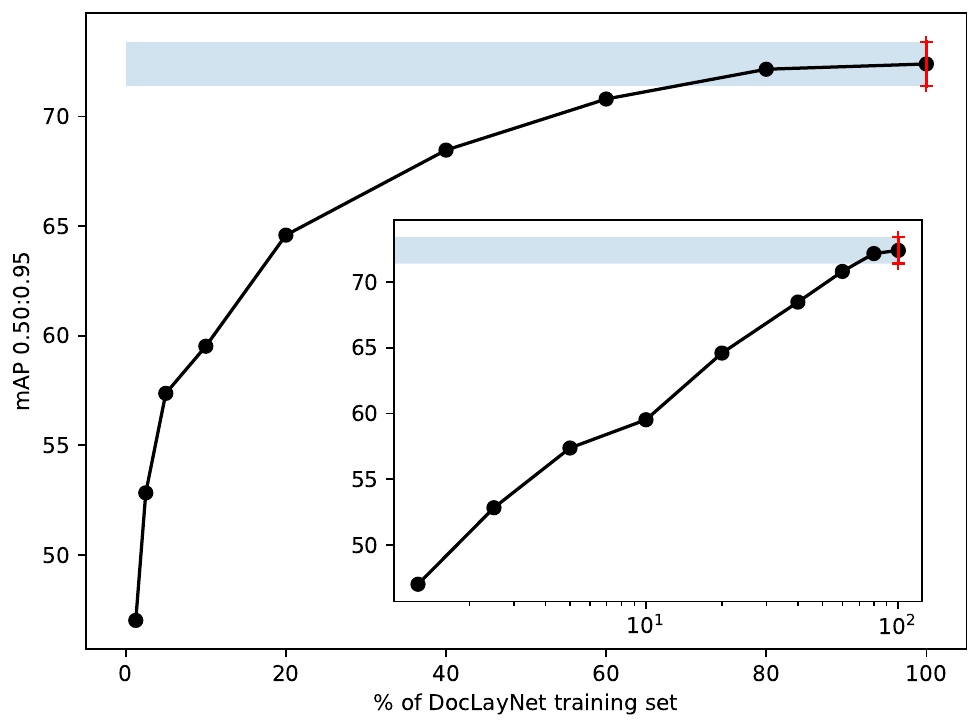
The authors trained Mask R-CNN on progressively more training data. Rerunning on the full training set five times gave an error of about ±1, the light-blue band in the figure.
The 80% point already falls within the error band of the 100% point. The authors conclude that adding more data of the same kind won't noticeably improve the model; further progress should come from better annotation consistency, data augmentation, or new document categories and layout styles.
With a logarithmic horizontal axis, the inset at bottom right shows an almost straight line, meaning that every tenfold increase in data adds roughly a fixed amount of mAP. That's a very typical learning-curve shape.
Would Fewer Classes Help?
Datasets define their classes differently, so comparing scores directly isn't fair. The authors tried merging DocLayNet's classes into fewer, for example folding Caption, Footnote, and Formula into Text, and Title into Section-header.
With 11 classes, the overall mAP is 72; merged into 6 classes, 73; with page headers and footers also removed, leaving the same 5 classes as PubLayNet, 78; and with List-item folded into Text as well, the closest match to PubLayNet's definitions, 77.
The scores of the remaining classes themselves barely change. The overall score rises mainly because page headers and footers were removed, and page footers are among the models' weakest classes.
Splitting by Page Adds 12 Points
This is the most practical experiment in the whole paper.
The authors built another version in which the training, validation, and test sets are made by sampling pages at random, so pages from the same document can appear in both the training and test sets. With the same Mask R-CNN R50:
| Split | 11 classes | 5 classes |
|---|---|---|
| By document | 72 | 78 |
| By page | 84 | 87 |
Compiled from Table 4 of the paper.
With 11 classes, the overall score jumps from 72 to 84. Broken down, the biggest jumps are Page-header (72 → 90) and Page-footer (62 → 89).
The reason isn't hard to guess. Every page of a document has nearly identical headers and footers. With a page-wise split, the model has already seen that document's headers and footers in the training set, and at test time it only has to recognize them. The extra points come from exam questions that leaked into the training set.
The authors write that, to their knowledge, neither PubLayNet nor DocBank took this into consideration. PubLayNet was actually split by journal, so pages from the same journal appear in only one set, which is stricter than splitting by document. Studies that collect their own data and randomly sample pages for a test set, on the other hand, fall into this trap easily.
A Different Exam
Last comes the cross-dataset comparison. The authors trained a Mask R-CNN R50 on each of PubLayNet, DocBank, and DocLayNet, then tested each on the other two datasets. Since the three have different classes, only the classes they share are compared.
| Train → test | PubLayNet | DocBank | DocLayNet |
|---|---|---|---|
| PubLayNet | 93 | 34 | 30 |
| DocBank | 48 | 68 | 27 |
| DocLayNet | 59 | 47 | 78 |
Compiled from the total row of Table 5 of the paper. PubLayNet and DocLayNet are compared on four classes, Figure, Section-header, Table, and Text; DocBank only on Picture and Table, because DocBank often merges consecutive paragraphs into one object.
The model trained on PubLayNet scores 93 on its own test set and just 30 on DocLayNet. DocBank shows a similar drop, from 68 to 27. On this basis the authors say that models trained on DocLayNet are far more robust.
Still, the DocLayNet model scores only 59 on PubLayNet, which isn't great. Part of this comes from the annotation definitions. PubLayNet boxes a whole list as one, while DocLayNet boxes each item; before comparing, the authors folded PubLayNet's lists into Text, so the Text score was bound to be dragged down. A fairer reading is that all three models drop a lot on other datasets, and DocLayNet's drops the least.
Limitations
The dataset's scope has a few boundaries:
- Almost all English; other languages add up to about 5%.
- Very few scans; receipts, invoices, and handwritten documents are out of scope.
- Only non-overlapping, upright rectangles are allowed; tilted or overlapping layouts can only be rejected.
- Boxes snap to the PDF's text, so pages where PDF parsing fails can't be labeled and are simply skipped.
The last point also shows that DocLayNet is essentially a “digital PDF” dataset; its difficulty lies in layout, not image quality.
Afterward
DocLayNet uses the CDLA-Permissive-1.0 license, which allows commercial use. FUNSD is limited to non-commercial research, so for teams that want to train products on the data, the difference is huge.
ICDAR 2023 held a layout analysis competition based on DocLayNet. In 2024, the same Zurich team open-sourced Docling, a document conversion tool whose layout model uses the RT-DETR architecture, retrained on DocLayNet plus other proprietary data, and takes under a second on a single CPU for a 72 dpi page image.
Before that, if you wanted a downloadable model trained on DocLayNet, you had to build it yourself. In September 2022, someone on GitHub asked the team to release the trained model weights from the paper. Four months later, the reply said they weren't planning to provide the weights as a maintained asset, that “it should be very easy to reproduce any object-detection model with this dataset on the latest deep-learning frameworks,” and that anyone who wanted to see the results could use their cloud document conversion service. (Very easy, which is why they leave it to everyone else.)
Also, the original DocLayNet on Hugging Face was read through a Python loading script. In August 2025, someone reported that newer versions of datasets no longer support such scripts and the dataset won't load; the issue still has no official reply. Fortunately, in 2023 the team also posted DocLayNet v1.1, stored as parquet files, so if you want to read it through Hugging Face, go straight to that one.
Conclusion
DocLayNet answers the question PubLayNet left open. Automatic annotation buys scale but not layout diversity; for diversity, you have to go back to people. The paper documents the cost and method of human annotation thoroughly, with a guideline of over a hundred pages, 974 pages of exam questions, 12 weeks of training, and 8 annotators who didn't pass, and it leaves behind a set of human agreement numbers to use as a reference.
The 12 points gained from a page-wise split are something you can use directly to check your own experiments. As long as your documents have fixed headers and footers or templates, a test set made of randomly sampled pages will almost certainly inflate your scores.
As for whether “Looking back on 175 years of looking forward.” on that annual report should be labeled Title or Text, the paper doesn't say. Judging by the 24 to 63 agreement on Title in financial reports, annotators with 12 weeks of training probably haven't finished arguing about it either.