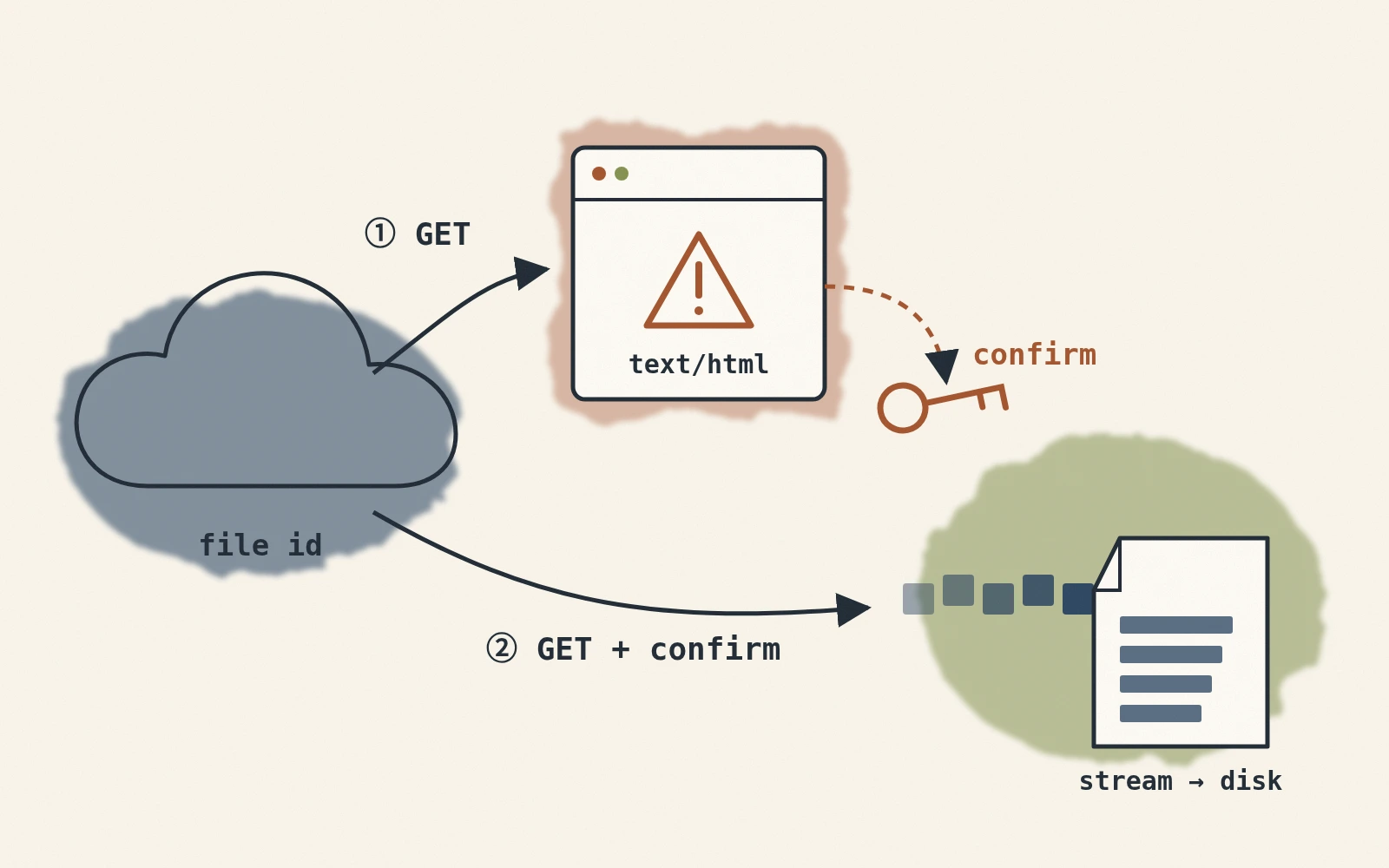
A Python download of a publicly shared Google Drive file can sometimes save a virus scan confirmation page as HTML. This article explains the two-request flow used on the original site and how to verify that the final response is a file.
Why Do We Only Get HTML?
A request to the web download URL may return the file directly, or it may return a confirmation page first. The trigger and page format are controlled by Google; a fixed file-size threshold is not reliable.
A browser can follow the confirmation button. A script must handle that response and verify the final HTTP status and download header before writing the target file.
Solution: Two-Step Request
The download has four steps:
- First request: Send a GET request to
https://docs.google.com/uc?export=downloadwith the file ID. - Check the response: A
Content-Dispositionheader lets the script proceed to stream the file. Otherwise, inspect whether the response is a confirmation page; do not save it as the target file. - Extract the confirmation token:
- From cookies: Google may place a
download_warning_xxxxxkey in the cookies, which contains the token. For example:token = session.cookies.get('download_warning_xxxxx') - From HTML: Sometimes, Google may not place the token in the cookies but in the HTML form. For example:
BeautifulSoup can read the hidden fields, including
<form id="download-form" action="https://drive.usercontent.google.com/download" method="get" > <input type="hidden" name="confirm" value="t" /> ... </form>confirmoruuid.
- From cookies: Google may place a
- Send the confirmation request: Pass the token or form fields, then check the HTTP status and download header again. This HTML workflow applies to publicly accessible files and can change. For private files or a stable production flow, use the Google Drive API download methods with authorization.
Code Implementation
First, install the necessary packages:
pip install requests tqdm beautifulsoup4
Then use the following Python function, providing the file ID, the name you want to save the file as, and the target directory to automatically determine whether a second request is needed and download the file successfully:
import os
import re
from urllib.parse import urljoin, urlparse
import requests
from tqdm import tqdm
from bs4 import BeautifulSoup

def download_from_google(file_id: str, file_name: str, target: str = "."):
    """
    Downloads a file from Google Drive, handling potential confirmation tokens for large files.

    Args:
        file_id (str):
            The ID of the file to download from Google Drive.
        file_name (str):
            The name to save the downloaded file as.
        target (str, optional):
            The directory to save the file in. Defaults to the current directory (".").

    Raises:
        Exception: If the download fails or the file cannot be created.

    Notes:
        This function handles both small and large files. For large files, it automatically processes
        Google's confirmation token to bypass warnings about virus scans or file size limits.

    Example:
        Download a file to the current directory:
            download_from_google(
                file_id="xxxxxxxxxxxxxxxxxxxxxxxxxxxxxxxx",
                file_name="example_file.txt"
            )

        Download a file to a specific directory:
            download_from_google(
                file_id="xxxxxxxxxxxxxxxxxxxxxxxxxxxxxxxx",
                file_name="example_file.txt",
                target="./downloads"
            )
    """
    # First try: docs.google.com/uc?export=download&id=FileID
    base_url = "https://docs.google.com/uc"
    session = requests.Session()
    params = {
        "export": "download",
        "id": file_id
    }
    response = session.get(base_url, params=params, stream=True, timeout=(10, 60))

    # If Content-Disposition is present, the file is directly available
    if "content-disposition" not in response.headers:
        # Try to get the token from cookies
        token = None
        for k, v in response.cookies.items():
            if k.startswith("download_warning"):
                token = v
                break

        # If no token in cookies, extract it from the HTML
        if not token:
            soup = BeautifulSoup(response.text, "html.parser")
            # Common case: HTML contains a form with id="download-form"
            download_form = soup.find("form", {"id": "download-form"})
            if download_form and download_form.get("action"):
                # Extract action URL, which might be drive.usercontent.google.com/download
                download_url = urljoin(response.url, download_form["action"])
                if urlparse(download_url).hostname not in {
                    "docs.google.com", "drive.google.com", "drive.usercontent.google.com"
                }:
                    raise RuntimeError("Unexpected Google Drive download host")
                # Collect all hidden inputs
                hidden_inputs = download_form.find_all("input", {"type": "hidden"})
                form_params = {}
                for inp in hidden_inputs:
                    if inp.get("name") and inp.get("value") is not None:
                        form_params[inp["name"]] = inp["value"]

                # Re-send the GET request with these parameters
                response = session.get(download_url, params=form_params, stream=True, timeout=(10, 60))
            else:
                # Otherwise, search for confirm=xxx in HTML
                match = re.search(r'confirm=([0-9A-Za-z-_]+)', response.text)
                if match:
                    token = match.group(1)
                    # Include the confirm token in the request
                    params["confirm"] = token
                    response = session.get(base_url, params=params, stream=True, timeout=(10, 60))
                else:
                    raise Exception("Unable to find the download link or confirmation token in the response. Download failed.")

        else:
            # Use the token obtained from cookies and resend the request
            params["confirm"] = token
            response = session.get(base_url, params=params, stream=True, timeout=(10, 60))

    # Ensure the download directory exists
    response.raise_for_status()
    if "content-disposition" not in response.headers:
        raise RuntimeError("Google Drive did not return a downloadable file")
    if not file_name or file_name in {".", ".."} or os.path.basename(file_name) != file_name:
        raise ValueError("file_name must be a filename, not a path")

    os.makedirs(target, exist_ok=True)
    file_path = os.path.join(target, file_name)

    # Start downloading the file in chunks, with a progress bar
    try:
        total_size = int(response.headers.get('content-length', 0))
        with open(file_path, "wb") as f, tqdm(
            desc=file_name,
            total=total_size,
            unit="B",
            unit_scale=True,
            unit_divisor=1024,
        ) as bar:
            for chunk in response.iter_content(chunk_size=32768):
                if chunk:
                    f.write(chunk)
                    bar.update(len(chunk))

        print(f"File successfully downloaded to: {file_path}")

    except Exception as e:
        raise Exception(f"File download failed: {e}")
How to Use
Assuming you have a file ID: YOUR_FILE_ID, you want to download it as big_model.onnx and store it in the ./models directory, just call it like this:
download_from_google(
    file_id="YOUR_FILE_ID",
    file_name="big_model.onnx",
    target="./models"
)
Once done, you'll find the successfully downloaded big_model.onnx in the ./models folder, and you’ll see the download progress in the terminal.
Command-Line Tool
The same function can be called from a command-line wrapper:
from download_from_google import download_from_google
import argparse

def main():
    parser = argparse.ArgumentParser(description="Download files from Google Drive.")
    parser.add_argument("--file-id", required=True, help="Google Drive file ID.")
    parser.add_argument("--file-name", required=True, help="Output file name.")
    parser.add_argument("--target", default=".", help="Output directory. Defaults to current folder.")
    args = parser.parse_args()

    download_from_google(file_id=args.file_id, file_name=args.file_name, target=args.target)

if __name__ == "__main__":
    main()
Save the code above as download_from_google_cli.py, then run it from the command line:
python download_from_google_cli.py \
 --file-id YOUR_FILE_ID \
 --file-name big_model.onnx \
 --target ./models
The script should fail if the final response is still an HTML or error page. The original site tested public files of 70 MB and 900 MB; those observations do not guarantee the same behavior for other permissions, file types or later page versions.